
Bot integration
The Bot integration type creates an integration with a web application based on user activity simulation with Selenium WebDriver.
The Details section of a Bot integration stores the integration config, and is used to set up the connection to the target. The Details page is opened in: ObserveID > Identity Automation > Integrations > {specific Bot integration} > Details
Additionally, to determine to operational behavior of the integration, the Operation Rules must be established for a Bot integration in: ObserveID >Identity Automation > Integrations > {specific Bot integration} > Operation Rules
In this section:
- Bot overview
- Integration prerequisites
- Bot connection parameters
- Bot operation rules
- Mandatory rules
- Authentication Rule*
- Get Metadata Rule*
- Get Integration Data Rule*
- Get Permission Type Rule*
- Get Resource Type Rule*
- Optional rules
- Create Account Rule
- Delete Account Rule
- Lock Account Rule
- Unlock Account Rule
- Update Account Entitlements Delta Rule
- Mandatory rules
Bot overview
Using one of the Selenium Client Libraries, the Bot integration can send the HTTP requests to the Selenium WebDriver, which in turn executes the requests on the browser and returns back the execution status. It allows the Bot integration to perform user actions on the web element of a web page of a web application. Among the user actions it is possible to point out to the mouse interactions and the keyboard interactions, such as: click, double click, drag-and-drop, key up, key down, etc.
Given that by means of the HTTP requests the user actions are simulated, the authentication approach used more often than others is the username\password pair of the user account. It is when the Bot integration emulates the entry of the credentials of the user to authenticate itself on the target. On top of that, every Bot integration is provided with the Authentication Rule, which depending on how it is configured, can implement another authentication method to use, if needed.
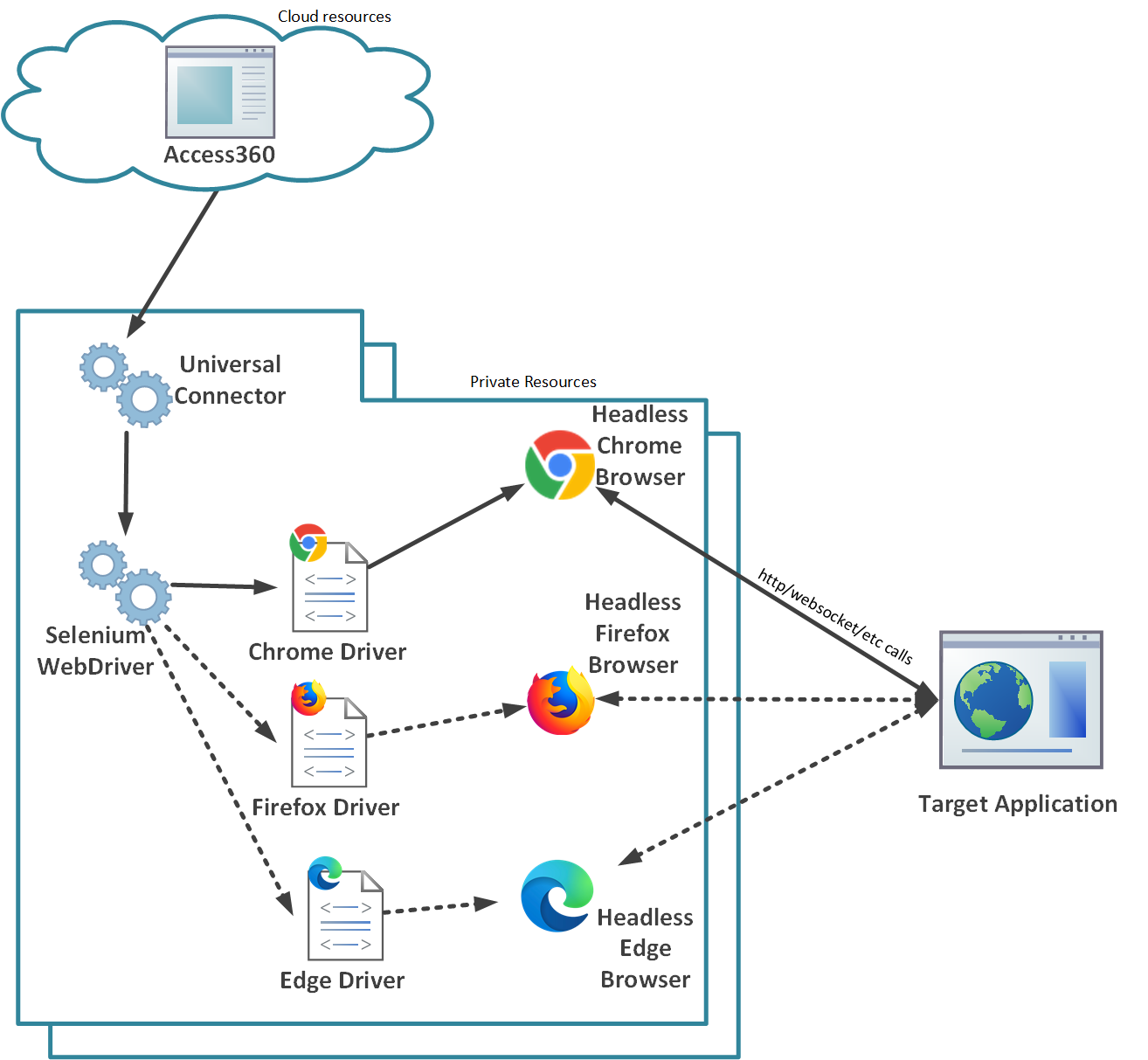 Interaction with the target application
- The browser establishes a TCP connection with the Target Application based on the requests received from the Universal Connector through Selenium.
- The ChromeDriver, which is a browser-specific driver, launches the browser in headless mode on the Universal Connector (UC) machine.
- The ChromeDriver listens for commands from the Selenium WebDriver, which is installed as a NuGet package as part of the UC's integrated development environment (IDE).
- Using the Selenium WebDriver library, the Universal Connector sends commands to the browser to perform user actions on the web elements of the Target Application's user interface. The Universal Connector then retrieves the results as a response.
Integration prerequisites
A Bot integration is allowed to act on the target within the permissions granted to the user account used for the connection parameters.
Prerequisites are the activities performed on the target before a connection is initialized by ObserveID. For a Bot integration, the prerequisites are:
-
to create a user account intended for the integration;
-
to authorize the account enough to view the integration data, and\or to create, delete, lock, or unlock accounts; grant and revoke permissions, etc. The exact scope of operations that the integration can perform on the target can be extended as needed and respectively require an extended set of permissions.
Bot connection parameters
To specify the connection parameters for a Bot integration, do the following:
-
Provide the general information about the integration, such as: Environment Type, Integration Name, Alternate Name, and Description. If needed, for more details, refer to the common cross-integration approach in the user guide.
-
Specify the base endpoint for HTTP requests in the Address Url field. As a rule, it is the base URL after successful authentication.
-
Specify the URL of the login form of the web application target in the Login Url field.
-
Provide the credentials of the user account for the Bot integration authentication:
-
enter the username in the User field;
-
enter the password in thePasswordfiled. ;
-
implement the Authentication Rule in the Operation Rules section.
-
Bot operation rules
For a Bot integration it is required to set up mandatory Operation Rules listed below. In case of optional Operation Rules, ones can be created on additional request.
Mandatory rules
Authentication Rule
The Authentication Rule is one of the mandatory rules for a Bot integration. It sends keystrokes on the fields of the login form with respectively entered credentials of the user account intended for the integration.
Get Metadata Rule
The Get Metadata Rule is one of the mandatory rules for a Bot integration. It executes the GetMetadata() method, which returns IntegrationMetadata. The Integration Metadata defines:
- the Integration Data entities: accounts, permissions and resources;
- the attributes of each entity; and
- the availability of each operation for an integration.
Get Integration Data Rule
The Get Integration Data Rule is one of the mandatory rules for a Bot integration. It executes the GetIntegrationData() method, which returns IntegrationData. The Integration Data is collected from the web pages of the target and recognized by the entity type: accounts, permissions, or resources.
Get Permission Type Rule
The Get Permission Type Rule is one of the mandatory rules, necessary for validation of the data fetched from the Bot integration. It executes the GetPermissionType() method, which establishes the permission type to the objects identified as permissions.
Get Resource Type Rule
The Get Resource Type Rule is one of the mandatory rules, necessary for validation of the data fetched from the Bot integration. The rule executes the GetResourceType() method, which establishes the resource type to the objects identified as resources.
Optional rules
Create Account Rule
The Create Account Rule is one of the optional rules for a Bot integration. It executes the CreateAccount() method, which returns a newly created account in a locked or unlocked state with the assigned password and permissions, passed among input parameters.
Delete Account Rule
The Delete Account Rule is one of the optional rules for a Bot integration. It executes the DeleteAccount() method, which deletes the account passed as an input parameter.
Lock Account Rule
The Lock Account Rule is one of the optional rules for a Bot integration. It locks the account passed as an input parameter to the LockAccount() method.
Unlock Account Rule
The Unlock Account Rule is one of the optional rules for a Bot integration. It unlocks the account passed as an input parameter to the UnlockAccount() method.
The Update Account Entitlements Delta Rule is one of the optional rules for a Bot integration. It executes the UpdateAccountEntitlementsDelta() method, which takes the list of permissions to be granted and\or revoked as an input parameter and implements it for the requested account.