
LDAP Active Directory integration
This is an integration with an Active Directory, a directory service designed for Windows operating systems. It uses the LDAP protocol for communication, based on a client-server model, and referred to a type of network database that uses trees of entries to store information. Within the LDAP AD integration, the target is requested for such information as: users and groups. The LDAP AD integration (de)provisions users with entitlements, and the entitlements represent active directory groups. The configuration of the integration requires setting up the connection parameters as well as outlining the base structure of the directory to define the user and group object classes.
In this section:
- Overview
- Active Directory integration operations
- Pre-requisites to setup of LDAP AD integration
- Setup of LDAP AD integration
- First Load of data from LDAP AD to ObserveID
- Coding integration rules
Overview
An LDAP AD integration is built with the LDAP integration type, and represents one of the implementations of an integration with a directory server. The target of this implementation is Microsoft Active Directory Domain Services, which can run on any of the following operating systems: Windows 2000 Server, Windows Server 2003, Microsoft Windows Server 2008.
The ObserveID LDAP Active Directory integration provides the IT security managers with the information stored within Microsoft Active Directory Services to help them perform the identity and access management tasks. The information being retrieved is called the ‘Integration Data’ and includes:
- the Active Directory object as the main resource;
- the User objects;
- the Active Directory Group objects;
- the Attributes defining the User and Group objects.
To create an LDAP AD integration in ObserveID and get it ready for the use, the base setup and configuration flow includes the following steps:
- Pre-requisites must be implemented on the Active Directory for ObserveID.
- Connection parameters that must be set up on ObserveID for the Active Directory.
- First load of data from the Active Directory to ObserveID should be successfully completed.
- Coding integration rules according to the business case requirements is the final step before the system is ready.
Integration Operations
An LDAP Active Directory integration can perform the following operations on the Integration Data:
|
Integration Operation |
Used by |
General description |
Integration-Specific Requirements |
|
Account Management | |||
|
Create Account |
Permanent Access Request, Temporary Access Request, Onboarding, Reinstatement, Role Creation, Role Update, Identities Update |
The LDAP Active Directory integration can create accounts. It requires Additional Properties to be established for accounts. The Additional Properties are coded with Provisioning Rules. |
The Additional Properties mandatory on the creation of an Active Directory account are: -
For any Active Directory requirements on what account properties are required and\or allowed to be set, refer to Provisioning Rules. |
|
Credentials Update |
Password Change Request, Privileged or Firecall Unlock Request |
A password can be set for an account on Account Creation, or updated with a workflow according to the Password Policy. For Privileged or Privileged Service account types, the password can be rotated. The password is rotated if ‘yes’ is established for an LDAP account in its ‘Rotatable’ property. |
For LDAP the following Password Policies are available: -
The |
|
Delete Account |
Account Removal, the Finish action on Temporary Access Request |
The LDAP Active Directory integration can delete accounts. The respective history records are stored for every Identity. |
n/a |
|
Offboarding, Emergency Deprovisioning |
When an Identity is terminated, their Active Directory account(-s) are deprovisioned according to the LDAP AD integration Leaver Rule. |
During Identity Termination, the LDAP integration Leaver Rule can set one of the following available options: - the LDAP accounts can be locked;
| |
|
Lock Account |
Privileged Unlock Request, Firecall Unlock Request, Manage Access, Permanent Access Request |
When the LDAP Active Directory integration unlocks and locks the Privileged or Privileged Service accounts, it sets the usage period for the account by allowing and disallowing it for the user to use. |
When an LDAP account is locked, its |
|
Unlock Account |
Privileged Unlock Request, Firecall Unlock Request |
When an LDAP account is unlocked, its | |
|
Update Account Additional Properties |
Identities Update |
Active Directory account properties can be updated if an Identity’s property has changed. Provisioning Rules should be configured to pass an Identity’s property to the Active Directory account. |
The Additional Properties allowed on the update of an Active Directory account are: -
For what information can be displayed for an Active Directory account, refer to the schema of the LDAP integration data. |
|
Target Management | |||
|
Pull Data |
DataImportTask, Identities Update, most workflows |
Within the LDAP Active Directory integration, the Integration Data is imported from Active Directory to ObserveID. |
For what Integration Data is fetched from the Active Directory target, refer to the schema of the LDAP integration data. |
|
Customization Rule can be configured to recognize, and\or set the type for an Active Directory account. |
Refer to the requirements to Customization Rule. | ||
|
Test Connection |
DataImportTask |
It is possible to troubleshoot if there is a connection between ObserveID and the Active Directory target. |
n/a |
|
Entitlement Management | |||
|
Grant Account Entitlements |
Privileged Access Request, Manage Access, Role Creation, Role Update, Identities Update |
The LDAP Active Directory integration can assign an account with entitlements. |
The entitlements that can be assigned to an Active Directory account are: - |
|
Revoke Account Entitlements |
Manage Access, Role Update, Role Deletion, Identities Update |
The LDAP Active Directory integration can revoke entitlements from the account. |
The entitlements that can be revoked from an Active Directory account are: - |
Prerequisites
There are prerequisite activities that are required to be performed on the Active Directory target side before the LDAP AD integration is configured on the ObserveID side. Below is a short overview of what is needed:
|
Prerequisite |
Parameters \ Values |
Description |
|
User |
n/a |
A User should be created on the Active Directory target for the LDAP AD integration. |
|
Privileges of the User |
|
The created User should be assigned with the built-in local security groups. |
|
Encrypted communications |
n/a |
For how to enable LDAP over SSL, refer to: LDAP over SSL (LDAPS) Certificate - TechNet Articles - United States (English) - TechNet Wiki (microsoft.com) |
Setup of integration
The configuration of the LDAP AD integration in ObserveID includes the connection parameters and the object class references to the Active Directory schema.
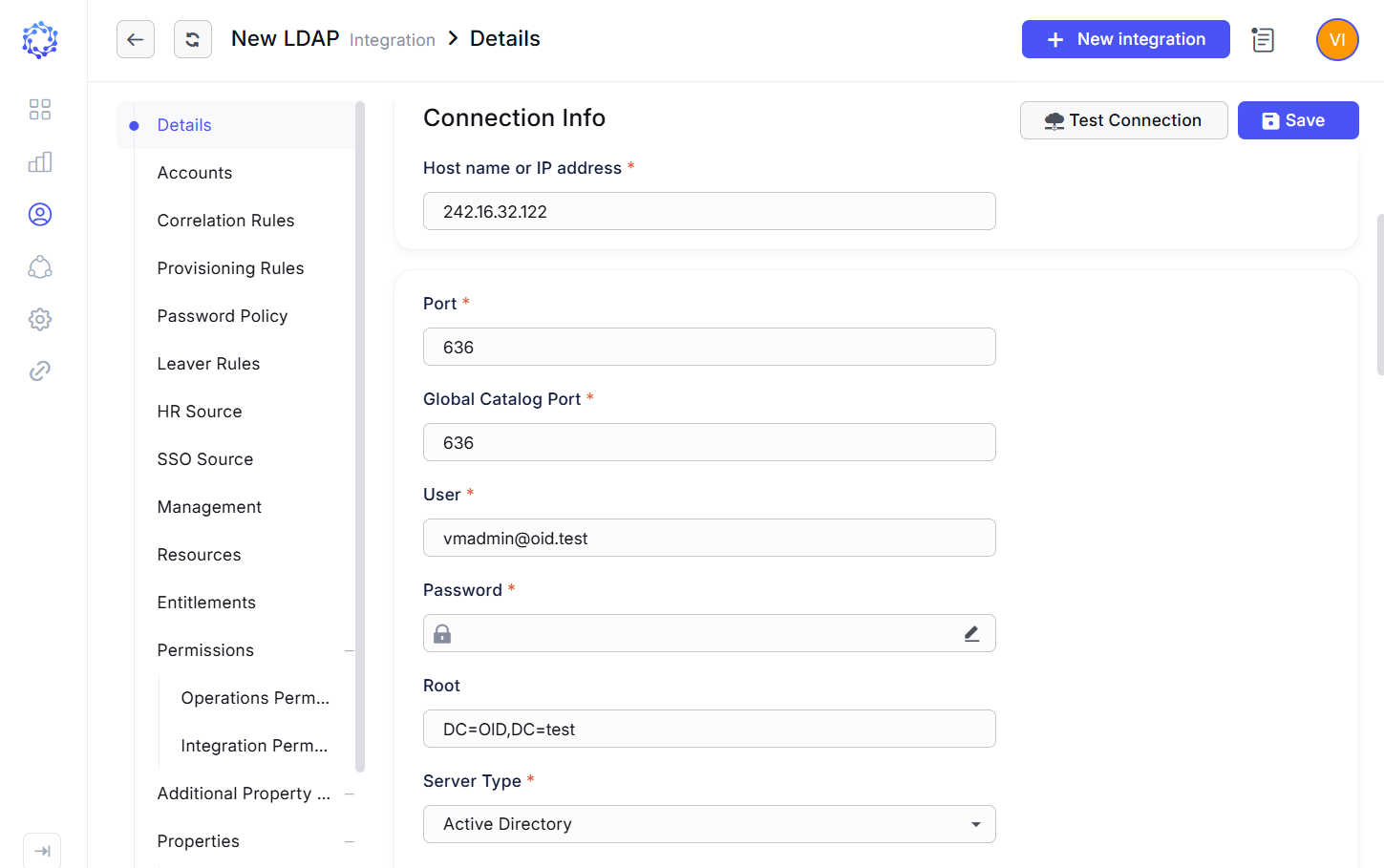 LDAP AD integration config
|
Parameter |
Description |
|
Host name or IP address |
Host name or the IP address of the host server. |
|
Port |
Port number established for the current instance of the LDAP server to listen to. |
|
User |
Username as one of credentials of the User on the LDAP server. |
|
Password |
Password as one of the credentials of the User on the LDAP server. |
|
Root |
Domain’s distinguished name. The format is provided below, where |
|
Server Type |
Directory Service types that the LDAP integration type can be used for to create an integration with: - Active Directory,
|
|
User Filter |
Object class that defines users in the Active Directory. The format is as follows, where |
|
User Name Attribute |
Attribute of the user class that shows an easy-to-read name of an object. Often, it is the |
|
Group Filter |
Object class that defines groups in the Active Directory. The format is as follows, where |
|
Group Name Attribute |
Attribute of the group class that shows an easy-to-read name of an object. Often, it is the |
|
Group Description Attribute |
Attribute of the group class that shows the description of a group object. The format is provided below, where |
|
Group Membership Attribute |
Attribute of the group class that shows the membership of a group object. The format is provided below, where |
|
User Object Class |
User type of the object class in the object schema of the LDAP server. The format is provided below, where |
|
Users Path |
Container of the user objects. The format of how to specify the container is as follows: |
|
Secure Socket Layer |
Set |
|
Ignore Server Certificate Errors |
Set |
|
Follow Referrals |
Set |
First Load of data
After the integration configuration is set up for LDAP AD in ObserveID, and the connection test is successfully completed via the Test Connection button in: ObserveID > Identity Automation > Integrations > {specific LDAP AD integration} > Details, next is the first load of data. For what data is loaded, refer to the schema of the LDAP integration data.
To make the first load of data from the target, perform the following:
- Run the DataImportTask which was automatically created, once the new LDAP AD integration was saved in ObserveID.
The grid of tasks in: ObserveID > Identity Automation > Requests > Tasks provides all available tasks, including the DataImportTask for the new LDAP AD integration.
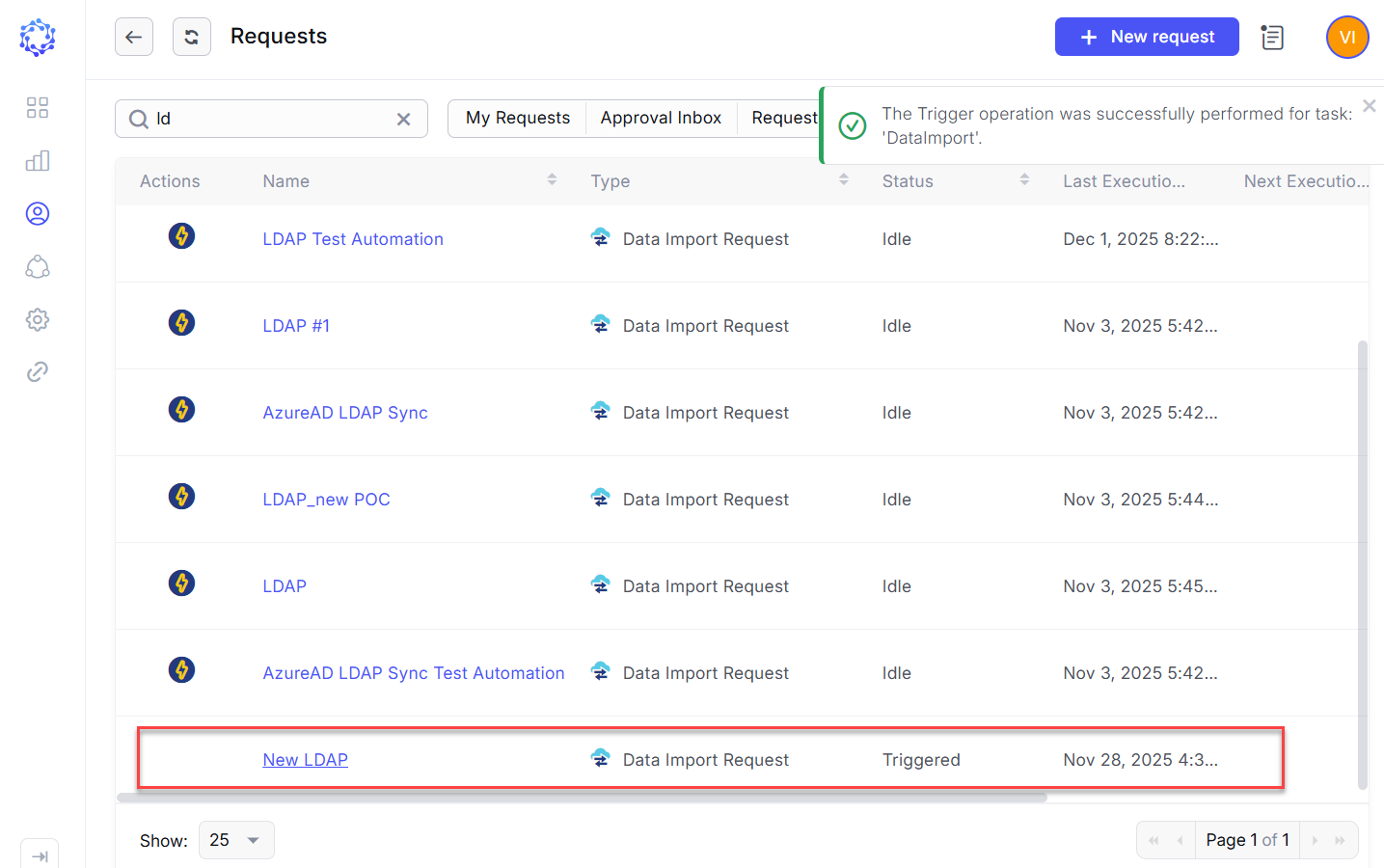 The DataImport task is triggered for LDAP AD
The DataImportTask is considered finishing successfully, if the integration data (i.e. accounts, entitlements, resources, and additional properties) is imported and shows up for the LDAP AD integration in: ObserveID > Identity Automation > Integrations > {specific LDAP AD integration}
Coding integration rules
By C#-coding the integration rules, the functional capabilities of the LDAP integration become ad-hoc configured to meet the requirements of a specific business case. In addition to flexibility, an important factor of the data management is the possibility to make it consistent across multiple systems in the organization infrastructure. The integration rules help to determine identity data in relation to the LDAP integration.
Below with the code samples and the Dependable variables \ parameters presented are the examples of how the LDAP integration and identity data can be defined.
|
Functional area |
Integration Rules |
Description |
Dependable variables \ Parameters |
|
Identity correlation |
Correlation Rule |
The name properties of the LDAP account can be compared with the name properties of the Identity’s HR Source Account, and thus, utilized for the correlation rule, unless business-driven needs require otherwise. The correlation establishes the Identity as the owner of an account. |
LDAP account’s Identity’s HR Source Account Identity’s HR Source Account |
|
Differentiating accounts by type |
Customization Rule |
Given that LDAP uses the name of the Identity for creating the login name of an LDAP account, the name of the Identity is used for differentiating the LDAP accounts by the type. |
Identity’s |
|
Account Creation |
Provisioning Rules |
Provisioning Rules set additional properties for the LDAP accounts created or updated in ObserveID. The following additional properties of an LDAP account, in addition to the mandatory properties, can be set with the Provisioning Rules:
Code samples are provided in the next section for some of the Provisioning Rules. |
Identity’s |
|
Identity Termination |
Leaver Rule |
The Leaver Rule defines how to treat the LDAP accounts if an Identity gets terminated. From all Leaver Rule options available, the option |
|