
Oracle IDCS integration
ObserveID Oracle IDCS integration uses the Oracle Identity Cloud Service REST API to manage users of Oracle Identity Cloud Service (abbrev. as ‘Oracle IDCS’) and to manage access that the users are provided with via Oracle IDCS to various applications. Within the ObserveID Oracle IDCS integration, all applications available on the target are imported as integration resources. It offers the opportunity to audit the access at each specific resource and review the properties defining it. Application Roles and Groups represent the permissions types of the entitlements available for (de)provisioning to Identities within Oracle IDCS accounts.
Oracle IDCS provides identity management, single-sign-on (SSO), and identity governance for applications on-premise, in the cloud, or on mobile devices. The document describes how to set up an integration with Oracle IDCS and what makes up the ObserveID Oracle IDCS Integration Data schema.
In this section:
- Overview
- Oracle IDCS integration operations
- Pre-requisites to setup of Oracle IDCS integration
- Identity Domain URL
- App registration
- Grant Type
- API access
- App Activation
- Setup of Oracle IDCS integration
- First load of data from Oracle IDCS target
- Coding integration rules
- Correlation Rule - code sample
- Customization Rule - code sample
- Provisioning Rule - Name - code sample
- Provisioning Rule - Family Name - code sample
- Provisioning Rule - Given Name - code sample
- Leaver Rule - code sample
Overview
The Oracle IDCS integration is intended for user and access management and analysis of the captured usage data about the Oracle IDCS users. In general, Oracle IDCS is a service that manages relationships Oracle IDCS users have with Cloud-based Oracle applications and Custom applications. The Oracle IDCS Integration Data describes the relationships, and from the high-level perspective, it embraces the following information retrieved from the target:
- applications Oracle IDCS is integrated with;
- users created in Oracle IDCS;
- the access the users are provided to the applications;
- application and administrator roles, groups as grantable entitlements in the Oracle IDCS integration;
- properties attributed to users, resources, and entitlements.
The following REST API endpoints are used for the operations of the Oracle IDCS integration:
|
Operation |
Endpoint |
|
To test the connection to the integration |
|
|
To test account credentials |
|
|
To pull the accounts |
|
|
To pull the groups |
|
|
To pull the applications |
|
|
To pull the application roles |
|
|
To pull the application role grants |
|
|
To create/delete an account |
|
|
To lock/unlock account |
|
|
To update account credentials |
|
|
To pull audit events for the Access Detection feature |
|
Below is the list of the Oracle IDCS integration objects retrieved from the target system:
- User
- Group
- App
- AppRole
- Grants
- AuditEvent
For the full schema of the integration data pulled from the target, refer to: Oracle IDCS schema of integration data
None of custom fields are used for the integration objects.
To create an Oracle IDCS integration in ObserveID and get it ready for the use, the base setup and configuration flow includes such steps as:
- Prerequisites must be implemented on Oracle IDCS for ObserveID.
- Connection parameters must be set up on ObserveID for Oracle IDCS.
- First load of data from Oracle IDCS to ObserveID should be successfully completed.
- Coding integration rules according to the business case requirements is the final step before the system is ready.
Oracle IDCS integration operations
An Oracle IDCS integration can perform the following operations on the Integration Data:
|
Integration Operation |
Used by |
Description |
Integration-Specific Requirements |
|
Account Management | |||
|
Create Account |
Permanent Access Request, Temporary Access Request, Onboarding, Reinstatement, Role Creation, Role Update, Identities Update |
The Oracle IDCS integration can create accounts. It requires Additional Properties to be established for accounts. The Additional Properties are coded with Provisioning Rules. |
The Additional Properties mandatory on the creation of an IDCS account are:
For any Oracle IDCS requirements on what account properties are required and\or allowed to be set, refer to the Oracle IDCS Integration Data schema. For coding the account properties via the Provisioning Rules, refer to the Coding Integration Rules section below. |
|
A password can be set for an account on Account Creation, or updated with a workflow according to the Password Policy. For Privileged or Privileged Service account types, the password can be rotated. The password is rotated if ‘yes’ is established for an Oracle IDCS account in its ‘Rotatable’ property. |
There is one Password Policy available for the Oracle IDCS integration:
| ||
|
Credentials Update |
Password Change Request, Privileged or Firecall Unlock Request | ||
|
Delete Account |
Account Removal, the Finish action on Temporary Access Request |
The Oracle IDCS integration can delete accounts. The respective history records are stored for every Identity. |
n/a |
|
Offboarding, Emergency Deprovisioning |
When an Identity is terminated, their Oracle IDCS account(-s) are deprovisioned according to the Oracle IDCS Leaver Rule. |
During Identity Termination, the Oracle IDCS integration Leaver Rule can be set with one of the following available options:
For coding the Oracle IDCS Leaver Rule, refer to the Coding Integration Rules section below. | |
|
Lock Account |
Privileged Unlock Request, Firecall Unlock Request, Manage Access, Permanent Access Request |
The Oracle IDCS integration can unlock and lock accounts of either Privileged type, or Privileged Service type. |
When an Oracle IDCS account is locked, its |
|
Unlock Account |
Privileged Unlock Request, Firecall Unlock Request |
When an Oracle IDCS account is unlocked, its | |
|
Update Account Additional Properties |
Identities Update |
Oracle IDCS account properties can be updated if an Identity’s property has changed. Provisioning Rules can be configured to pass an Identity’s property to the Oracle IDCS account. |
The Additional Properties allowed on the update of an Oracle IDCS account are:
For what information can be displayed for an Oracle IDCS account, refer to the Oracle IDCS Integration Data schema. |
|
Target Management | |||
|
Pull Data |
DataImport, Identities Update, most workflows |
Within the Oracle IDCS integration, the Integration Data is imported from Oracle IDCS to ObserveID. |
For what the Integration Data is fetched from the Oracle IDCS target, refer to: Oracle IDCS schema of integration data |
|
Correlation and Customization Rules can be configured to recognize the Identity for an account and the account type. |
Refer to the requirements to Correlation and Customization Rules. | ||
|
Test Connection |
Test Connection, DataImport |
With Test Connection, it is possible:
|
For any details on the Oracle IDCS Integration Configuration, refer to the Setup of Oracle IDCS integration section below. |
|
Entitlement Management | |||
|
Grant Account Entitlements |
Permanent Access Request, Manage Access, Role Creation, Role Update, Identities Update |
The Oracle IDCS integration can assign the user with an entitlement. |
The entitlements that can be assigned to an Oracle IDCS account are:
|
|
Revoke Account Entitlements |
Manage Access, Role Update, Role Deletion, Identities Update |
The Oracle IDCS integration can revoke an entitlement from the user. |
The entitlements that can be revoked from an Oracle IDCS account are:
|
|
Access Detection | |||
|
Detect Access |
Audit Log report type of Analytics |
User sessions detected on the Oracle IDCS target can be compiled into a report. The detected session records are provided with extra details:
|
Oracle-IDCS-specific additional properties of the detected sessions are as follows:
|
|
Detect Access Text Logs |
Analytics > Audit Log reports |
Information generated by Oracle IDCS API endpoint: /admin/v1/AuditEvents |
Oracle IDCS provides log events for every detected session with the following json-data schema:
|
Pre-requisites to setup of Oracle IDCS integration
Below is a short overview of the prerequisites to complete:
|
Pre-requisite |
Value |
Description |
|
Logged-in user permissions |
or
|
These are the roles that should allow you to make preparations on the Oracle IDCS side for the integration with ObserveID. |
|
Identity Domain URL |
https://<tenant-name>.identity.oraclecloud.com |
The Identity Domain URL for REST API calls is a part of the Oracle Cloud Service instance URL, which includes the tenant name. The Oracle Identity Cloud Service tenant name begins with the characters |
|
App registration |
|
The App registration is required to obtain the credentials (i.e. Client ID and Client Secret) used for authentication in REST API calls. |
|
Grant Type |
|
Authentication type for the app to use in REST API calls. |
|
API access |
|
The Identity Cloud Service Admin API access should be granted with the App Role. |
|
App Activation |
|
The Activate option should be enabled for the app to make it active. |
Setup of Oracle IDCS integration
The connection parameters specified below must be populated in ObserveID for the Universal Connector to connect to the Oracle IDCS target. The connection parameters are established in: ObserveID > Identity Automation > Integrations > {specific Oracle IDCS integration} > Details.
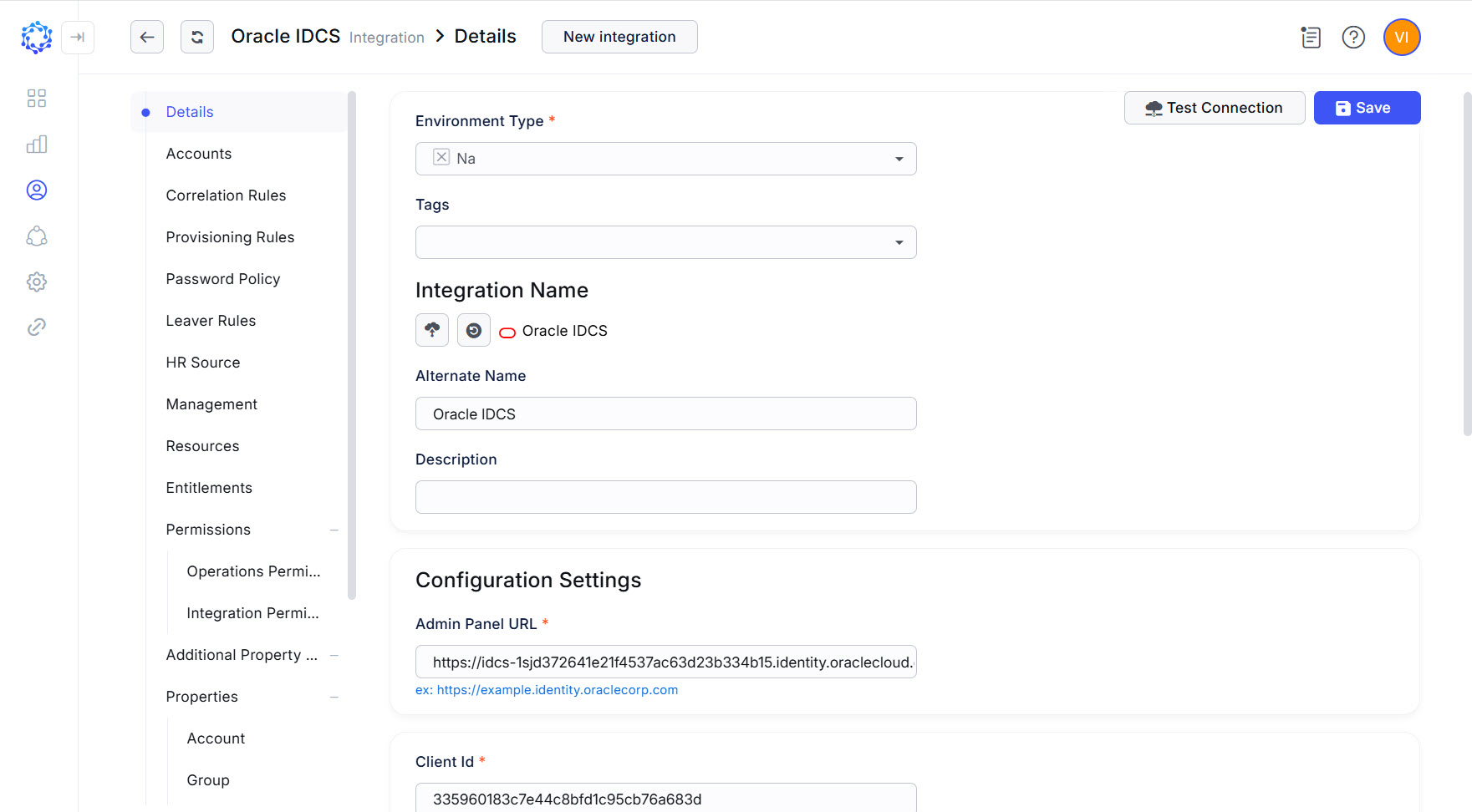 Oracle IDCS integration config
|
Parameter |
Description |
|
Environment Type |
Environment the new integration pertains to. The Na option establishes no environment. |
|
Integration Name |
Automatically generated name for the new integration. The name is created by combining the Integration Type with what is established as Environment Type, Alternate Name, and Description for the new integration. |
|
Alternate Name |
Any preferred name for the new integration. |
|
Description |
Any valid text to differentiate one integration from another. This text is displayed in addition to the integration name in several UI elements, e.g., dropdown lists, in the system. |
|
Admin Panel URL |
Identity Domain URL for REST API calls. |
|
Client ID |
The Client ID of the registered app. |
|
Client Secret |
The Client Secret of the registered app. |
|
Consider Session Closed If No Action For Seconds |
Timeout in seconds that determines when the Universal Connector should generate the closed session event to mark the end of an active session due to the absence of any activity detected on the target. The default value for the Oracle integration is |
First load of data from Oracle IDCS target
After the connection parameters are established for Oracle IDCS in ObserveID. And the connection test is successfully completed, next is the first load of data. It allows the systems to set up an initial point starting from which it is possible to determine and synchronize deltas later. For what data is loaded, see: Oracle IDCS schema of integration data
Once the Oracle IDCS integration is saved, the DataImportTask is automatically created for it, and does all the import: the initial load and whenever it is needed to fetch the latest data from the target since then.
- The DataImportTask created for the Oracle IDCS integration is available in: ObserveID > Identity Automation > Workflows >Tasks
The DataImportTask is considered finishing successfully, if the integration data (i.e. accounts, entitlements, resources, and properties) is imported and shows up for the Oracle IDCS integration in ObserveID.
Coding integration rules
By C#-coding the integration rules, the functional capabilities of the Oracle IDCS integration become ad-hoc configured to meet the requirements of a specific business case. In addition to flexibility, an important factor of the data management is the possibility to make it consistent across multiple systems in the organization infrastructure. The integration rules help to determine the identity data in relation to the Oracle IDCS integration.
Below with the code samples and the Dependable variables \ parameters presented are the examples of how the integration and identity data can be defined.
|
Functional area |
Integration Rules |
Description |
Dependable variables \ Parameters |
|
Identity correlation |
Correlation Rule |
With the The correlation establishes the Identity as the owner of an account. A code sample is provided below for the Correlation Rule. |
Oracle IDCS account’s Identity’s |
|
Differentiating accounts by type |
Customization Rule |
Given that Oracle IDCS uses the |
Oracle IDCS account’s |
|
Account Creation |
Provisioning Rules |
Provisioning Rules set additional properties for the Oracle IDCS accounts created or updated in ObserveID. The following additional properties of an Oracle IDCS account are set with the Provisioning Rules:
Code samples are provided below for the Provisioning Rules. |
Identity’s Identity’s |
|
Identity Termination |
Leaver Rule |
Oracle IDCS integration has no constraints on how the accounts should be deprovisioned in case of the termination of an Identity. And all Leaver Rule options are applicable. The Leaver Rule defines how to treat the Oracle IDCS accounts if an Identity gets terminated. A code sample of the Leaver Rule is presented below. And to change one option into another, it is enough to set the needed value for the object: |
|
Correlation Rule - code sample
Setting up the correlation rule, it is important to start from aligning the two sides of the equation: the property of the Identity and the property of an Oracle IDCS account. If the Name of the account is based on the email address, then the correlation rule should take the email address of the Identity too. The code sample below defines the correlation based on the email address.
var account = readOnlyAccess360DbContext.Accounts
    .Where(x => x.IntegrationId == integrationId && x.Id == accountId && !x.Terminated)
    .SingleOrDefault();

if(account is not null) {
     var accountPrincipal = account.Name.Replace("adm_", "")
            .Replace("adm", "")
            .Replace("demo@", "@")
            .Replace("demo1@", "@")
            .ToLower();

     var ownerIdentityId = readOnlyAccess360DbContext.Identities
                    .Where(x => x.Email.ToLower().StartsWith(accountPrincipal) && !x.Terminated)
                    .Select(x => x.Id)
                    .SingleOrDefault();

     if (ownerIdentityId != default) {
           return new(ownerIdentityId, OwnerType.Identity);
     }
}

return null;
Customization Rule - code sample
The following customization rule determines the type of imported accounts based on the prefix that is set at the beginning of the value of the Name property of an Oracle IDCS account.
var accountName = readOnlyAccess360DbContext.Accounts
    .Where(x => x.IntegrationId == integrationId && x.Id == accountId && !x.Terminated)
    .Select(x => x.Name)
    .SingleOrDefault();

if (accountName is not null)
{
    if (accountName.StartsWith("adm_"))
    {
        return (AccountType.PersonalPrivileged, null, null, null);
    }
    if (accountName.StartsWith("tmp_"))
    {
        return (AccountType.Temporary, null, null, null);
    }
}

return (AccountType.Personal, null, null, null);
Provisioning Rule - Name - code sample
For the Name property of an Oracle IDCS account, the following Provisioning Rule establishes the Email property of the Identity.
return identity.Email;Provisioning Rule - Family Name - code sample
For the Family Name property of an Oracle IDCS account to be created and\or updated with, the following Provisioning Rule establishes the last word taken from the Name property of an Identity.
var indexOfSpace = identity.Name.IndexOf(' ');
if(indexOfSpace != -1)
{
   return identity.Name.Substring(indexOfSpace + 1);
}

return identity.Name;
Provisioning Rule - Given Name - code sample
For the Given Name property of an Oracle IDCS account to be created and\or updated with, the following Provisioning Rule establishes the first word taken from the Name property of an Identity.
var indexOfSpace = identity.Name.IndexOf(' ');
if(indexOfSpace != -1)
{
   return identity.Name.Substring(0, indexOfSpace);
}

return identity.Name;
Leaver Rule - code sample
The Leaver Rule below shows an example of an established option out of the available ones in case of the Oracle IDCS integration.
return (AccountTerminationBehavior.Delete, null, null);