
Oracle OCI integration
The ObserveID Oracle OCI integration uses Oracle Cloud Infrastructure REST API to communicate with the target and fetch the information needed for identity and access management tasks. The integration is mainly focused on provisioning the Groups. It also fetches policies and translates their verbs into permissions to showcase actual access and affected resources. The ObserveID Oracle OCI integration is covered herein with a general overview of available operations, the integration data schema, and the integration setup and configuration parameters.
In this section:
- Overview
- Oracle OCI integration operations
- Pre-requisites to setup of Oracle OCI integration
- Local user
- Privileges for the local user
- API Key
- Setup of Oracle OCI integration
- First load of data from Oracle OCI target
- Coding integration rules
- Provisioning Rule - Name - code sample
- Provisioning Rule - Description - code sample
- Provisioning Rule - Email - code sample
Overview
Oracle Cloud Infrastructure (abbrev. as 'OCI') is a platform of cloud services that enable the user to build and run a wide range of applications in a highly-available, consistently high-performance environment. By dealing with such OCI integration data objects as: accounts, entitlements, and resources, the ObserveID Oracle OCI integration allows one to review access, track changes in access assignments, and provision and deprovision access.
For OCI the following CLR libraries of 59.0.0 version are used:
- OCI.DotNetSDK.Audit
- OCI.DotNetSDK.Common
- OCI.DotNetSDK.Identity
- OCI.DotNetSDK.Resourcesearch
The following REST API methods are used for the operations of the OCI integration:
|
Operation |
Method |
|
To retrieve info about current tenant for the Test Connection operation, which is successful, if the information about the tenant is successfully pulled. |
|
|
To pull all available regions |
|
|
To pull the resources on the available regions |
|
|
To pull the accounts |
|
|
To pull the groups |
|
|
To pull the policies |
|
|
To pull user groups |
|
|
To create a user |
|
|
To add the password to the user or reset it |
|
|
To add user to the group |
|
|
To lock or unlock the user |
|
|
To delete the account |
|
|
Before the account removal, to remove all existing groups |
|
|
To pull the audit logs |
|
- Policy
- PolicyStatement
- ResourceSummary
- Group
- User
- UiPassword
- AuditEvent
- Tenancy
- Region
- UserGroupMembership
No additional or custom fields are used or pulled from the objects.
To set up an Oracle OCI integration in ObserveID and get it ready for the use, the base setup and configuration flow includes the following steps:
- Prerequisites must be implemented on Oracle OCI for ObserveID.
- Connection parameters must be set up on ObserveID for Oracle OCI.
- First load of data from Oracle OCI to ObserveID should be successfully completed.
- Coding the integration rules according to the business case requirements is the final step before the system is ready.
Oracle OCI integration operations
An Oracle OCI integration can perform the following operations on the Integration Data:
|
Integration Operation |
Used by |
General description |
Integration-Specific Requirements |
|
Account Management | |||
|
Create Account |
Permanent Access Request, Temporary Access Request, Onboarding, Reinstatement, Role Creation, Role Update, IdentitiesUpdateTask |
The Oracle OCI integration can create accounts. It requires Additional Properties to be established for accounts. The Additional Properties are coded with Provisioning Rules. |
The Additional Properties mandatory on the account creation are:
Refer to the requirements to Provisioning Rules. |
|
It also requires a password to be provisioned. |
An autogenerated one-time password is established for every new account of any account type. And on first login, the user is requested to update the password. | ||
|
Delete Account |
Account Removal, the Finish action on Temporary Access Request |
The Oracle OCI integration can delete accounts. The respective history records are stored for every Identity. |
n/a |
|
Offboarding, Emergency Deprovisioning |
An account can also be deleted on offboarding\emergency deprovisioning. |
Refer to the requirements to the Leaver Rule. There are options to be coded for the rule. | |
|
Lock Account |
Privileged Unlock Request, Firecall Unlock Request, Manage Access, Permanent Access Request |
The Oracle OCI integration can unlock and lock accounts of either Privileged type, or Privileged Service type. |
n/a |
|
Unlock Account |
Privileged Unlock Request, Firecall Unlock Request |
n/a | |
|
Update Account Credentials |
Privileged Unlock Request, Firecall Unlock Request |
Credentials are established for all account types, and can be rotated for Privileged or Privileged Service types. Credentials are rotated if ‘yes’ is established for an Oracle OCI account in its ‘Rotatable’ property. |
n/a |
|
Update Account Additional Properties |
IdentitiesUpdateTask |
Oracle OCI account properties can be updated if an Identity’s property has changed. Provisioning Rules can be configured to pass an Identity’s property to the Oracle OCI account. |
The Additional Properties allowed on the account update are:
|
|
Target Management | |||
|
Pull Data |
DataImportTask, IdentitiesUpdateTask, most workflows |
Within the Oracle OCI integration, the Integration Data is imported from Oracle OCI to ObserveID. |
For what the Integration Data is fetched from the Oracle OCI target, refer to: Oracle OCI Integration Data schema |
|
Correlation and Customization Rules can be configured to recognize the Identity and the account type. |
Refer to the requirements to Correlation and Customization Rules. | ||
|
Test Connection |
DataImportTask |
It is possible to troubleshoot if there is a connection between ObserveID and the Oracle OCI target. |
n/a |
|
Entitlement Management | |||
|
Grant Account Entitlements |
Privileged Access Request, Manage Access, Role Creation, Role Update, IdentitiesUpdateTask |
The Oracle OCI integration can assign the account with an entitlement. |
An Account can be assigned with:
|
|
Revoke Account Entitlements |
Manage Access, Role Update, Role Deletion, IdentitiesUpdateTask |
The Oracle OCI integration can revoke an entitlement from the account. |
An Account can be revoked of:
|
|
Other operations | |||
|
Detect Access |
Analytics, Violations |
The Oracle OCI integration can help one track the user’s sessions on the Target. |
|
|
Detect Access Text Logs |
Analytics, Violations |
The Oracle OCI integration can provide details about the user’s sessions on the Target. |
n/a |
Pre-requisites to setup of Oracle OCI integration
Below is a short overview of the prerequisites to complete:
|
Pre-requisites |
Value |
Description |
|
Local user |
n\a |
A local user should be created for the ObserveID on the Oracle Cloud Infrastructure side: Oracle Cloud Infrastructure > Identity & Security > Identity > Users |
|
Privileges for the local user |
|
The local user should be granted the It is a built-in group with which any tenancy comes in as well as with the policy that gives the Administrators group access to all of the Oracle Cloud Infrastructure API operations. |
|
API Key |
|
The API Key should be generated from the logged-in Local User that is supposed to be used by ObserveID for API calls. The private key is generated in the PEM format into a txt-file along with the following items:
|
Setup of Oracle OCI integration
The connection parameters specified below must be populated in ObserveID for the Universal Connector to connect to the Oracle OCI target. The connection parameters are established in: ObserveID > Identity Automation > Integrations > {specific Oracle OCI integration} > Details.
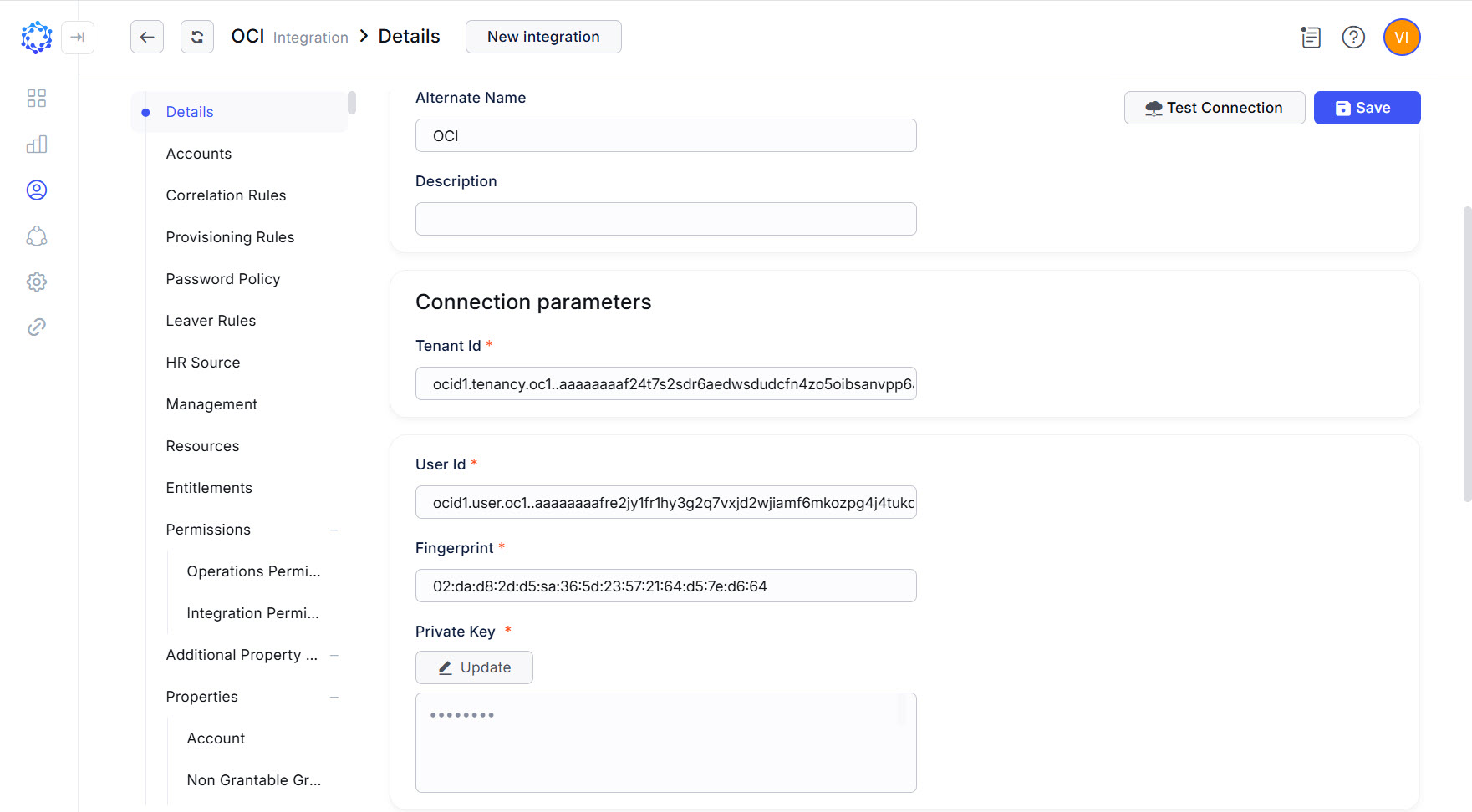 Oracle OCI integration config
|
Parameter |
Description |
|
Environment Type |
Environment the new integration pertains to. The Na option establishes no environment. |
|
Integration Name |
Automatically generated name for the new integration. The name is created by combining the Integration Type with what is established as Environment Type, Alternate Name, and Description for the new integration. |
|
Alternate Name |
Any preferred name for the new integration. |
|
Description |
Any valid text to differentiate one integration from another. This text is displayed in addition to the integration name in several UI elements, e.g., dropdown lists, in the system. |
|
Tenant Id |
It is the OCID of the tenancy, which is the root compartment containing all resources of the Oracle Cloud Infrastructure. |
|
User Id |
It is the OCID of the local user created for ObserveID in the Oracle Cloud Infrastructure. |
|
Fingerprint |
It is the fingerprint generated together with the key. |
|
Private Key |
It is the private key in the PEM format generated under the API Keys section of the local user profile. |
|
Consider session closed if no action for, seconds |
Timeout in seconds that determines when the Universal Connector should generate the closed session event to mark the end of an active session due to the absence of any activity detected on the target. The default value for the Oracle OCI integration is |
First load of data from Oracle OCI target
After the connection parameters are established for Oracle OCI in ObserveID and the connection test is successfully completed, the first load of data follows. This allows the systems to set up an initial point from which it is possible to determine and synchronize deltas later.
There is a task to perform the first load: the DataImport task. Once an integration is created, the data import task is also created and does all the import: the initial load and when it is needed to fetch the latest data from the target.
The DataImport task created for the Oracle OCI integration is available in: ObserveID > Identity Automation > Workflows >Tasks
The DataImport task is considered finished successfully if the integration data (e.g., accounts, entitlements, resources, and properties) is imported and shows up for the Oracle OCI integration in ObserveID.
Coding integration rules
By C#-coding the integration rules, the functional capabilities of the Oracle OCI integration become ad-hoc configured to meet the requirements of a specific business case.
|
Functional area |
Integration Rules |
Description |
Examples \ Parameters |
|
Identity correlation |
Correlation Rule |
With the For more details on the additional properties of the account, refer to the schema of the Oracle OCI integration data. |
|
|
Differentiating accounts by type |
Customization Rule |
Given that Oracle OCI requires for the |
Not |
|
Account Creation |
Provisioning Rules |
There are three Provisioning Rules that are intended to establish the following additional properties for an account:
For the requirements to how those parameters should be coded, refer to the schema of the Oracle OCI integration data. |
|
|
Identity Termination |
Leaver Rule |
Oracle OCI integration has no constraints on how the accounts should be deprovisioned in case of the termination of an Identity. All Leaver Rule options are applicable. |
n/a |
Provisioning Rule - Name - code sample
const string postfix = "observeid.com";
var identityName = identity.Name;

if (identityName.Contains("@"))
{
    identityName = identityName.Substring(0, identityName.IndexOf("@"));
}

var name = identityName.Replace(" ","") + "demo";
if (accountType == AccountType.Temporary) name = "tmp" + name;
if (accountType == AccountType.PersonalPrivileged) name = "adm" + name;
if (accountType == AccountType.PrivilegedService) name = "adms" + name;

return $"{name}@{postfix}";
Provisioning Rule - Description - code sample
return identity.Name;Provisioning Rule - Email - code sample
const string postfix = "observeid.com";
var identityName = identity.Name;

if (identityName.Contains("@"))
{
    identityName = identityName.Substring(0, identityName.IndexOf("@"));
}

var name = identityName.Replace(" ","") + "demo";
if (accountType == AccountType.Temporary) name = "tmp" + name;
if (accountType == AccountType.PersonalPrivileged) name = "adm" + name;
if (accountType == AccountType.PrivilegedService) name = "adms" + name;

return $"{name}@{postfix}";