
Oracle OCI Integration Data schema
The integration data schema defines what data is imported within the Oracle OCI integration. In this section:
- Account
- Resource Types
- Tenancy
- Compartment
- Policy
- Permission Types
- Group
- Action
Account
The Local User objects are imported from Oracle OCI and displayed as the Account objects in ObserveID. The attributes of the user are represented with the Additional Properties objects of the Account.
Some Additional Properties can be required on the creation of an account and that is often accounted for the requirements of the Target system. Other Additional Properties can be allowed, and if needed, established for an account when it is created. This information is displayed in the On Creation column. There are also Additional Properties that are allowed to be updated with the IdentitiesUpdateTask. If an Additional Property can be updated is displayed in the On Update column.
|
Account Property |
Type |
Description |
On Creation |
On Update |
|
Name |
String |
The name you assign to the user during creation. This is the user's login for the Console. The name must be unique across all users in the tenancy and cannot be changed. Target requirements:
|
Required |
Required |
|
DbUserName |
String |
DB username of the DB credential. Has to be unique across the tenancy. |
n/a |
n/a |
|
Description |
String |
The description you assign to the user during creation. Does not have to be unique, and it's changeable. (For tenancies that support identity domains) You can have an empty description. Target requirements:
|
Required |
Required |
|
|
String |
The email you assign to the user during creation. The email must be unique across all users in the tenancy. (For tenancies that support identity domains) The email address is required unless the requirement is disabled at the tenancy level. Target requirements:
|
Allowed |
Allowed |
|
EmailVerified |
Boolean |
Whether the email address has been validated. |
n/a |
n/a |
|
IsMfaActivated |
Boolean |
Flag indicates if MFA has been activated for the user. |
n/a |
n/a |
|
TimeCreated |
DateTime |
Date and time the user was created, in the format defined by RFC3339. Example: |
n/a |
n/a |
Resource Types
The resource objects are imported from Oracle OCI and displayed as the resources of the Oracle OCI integration in ObserveID. Every resource is represented with a resource type. The attributes of the resource are displayed in ObserveID as Additional Properties of a resource and listed in the Properties section of the Oracle OCI integration, see the figure below, according to the resource type.
To view what Additional Properties can be fetched for a resource from the Oracle OCI target; it is needed to:
- Scroll down the left-hand vertical menu of the Oracle OCI integration up to the Properties section.
- Expand the Properties section.
- Click a Resource Type.
- And the available Additional Properties of the Resource Type schema are displayed on the right in the grid.
Oracle OCI has a great number of resources, and allows the Oracle OCI integration to fetch and display a schema for those Resource Types. Because of their large quantity, it would be an overload to present all schemas herein. However, there is some reference below for the most popular ones. For more information, please, refer to the Oracle OCI documentation.
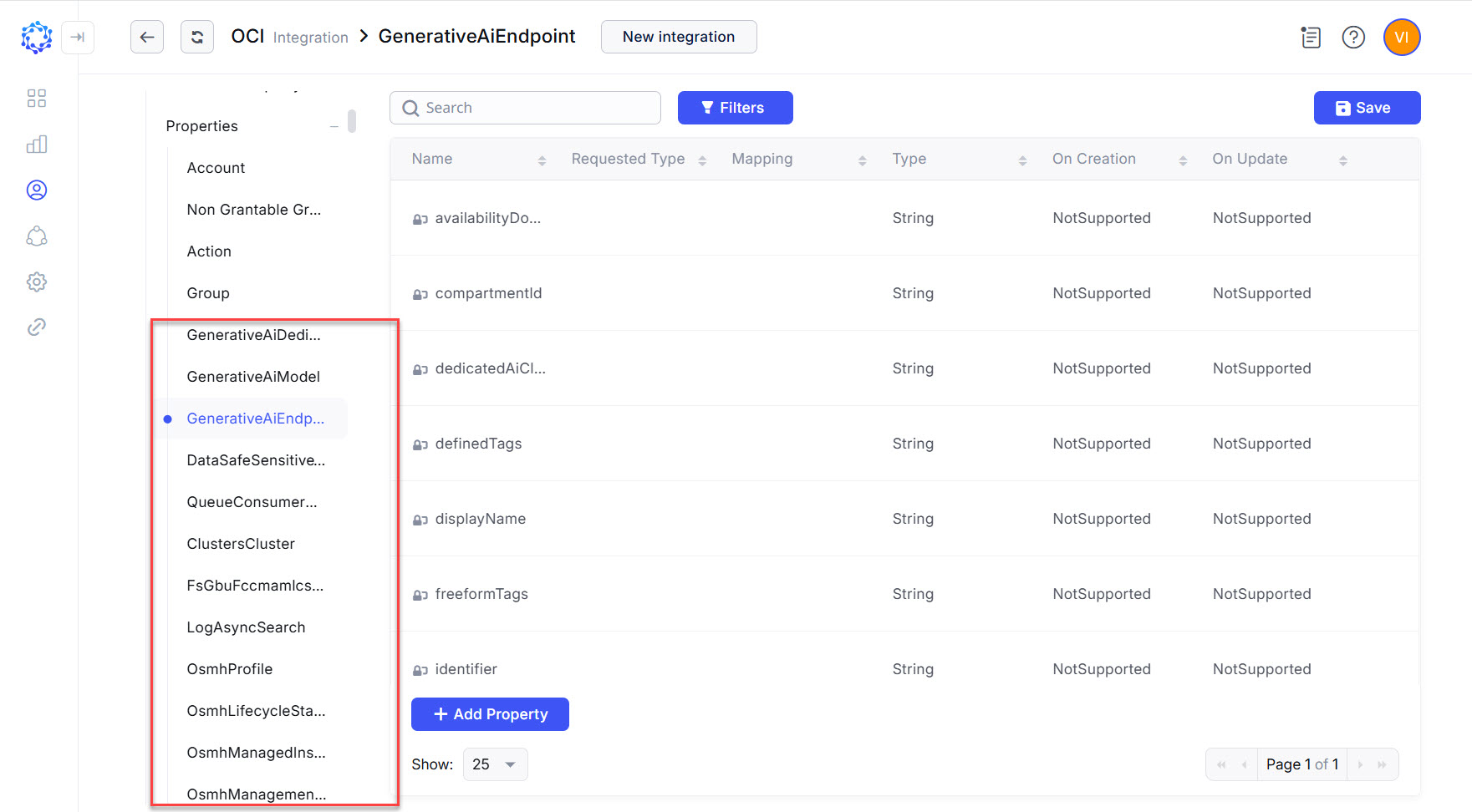 Resource Types in the Oracle OCI integration
|
Resource Property |
Type |
Description |
|
Tenancy The root compartment that contains all of the organization's compartments and other Oracle Cloud Infrastructure cloud resources. | ||
|
Name |
String |
The name of the tenancy. |
|
Compartment A collection of related resources which serves for organizing and isolating the cloud resources. | ||
|
availabilityDomain |
String |
|
|
compartmentId |
String |
The OCID of the parent compartment containing the compartment. |
|
definedTags |
String |
Defined tags for this resource. Each key is predefined and scoped to a namespace. Example: |
|
description |
String |
The description you assign to the compartment. Does not have to be unique, and it's changeable. |
|
displayName |
String |
|
|
freeformTags |
String |
Free-form tags for this resource. Each tag is a simple key-value pair with no predefined name, type, or namespace. Example: |
|
identifier |
String |
The OCID of the compartment. |
|
inactiveStatus |
String |
The detailed status of INACTIVE lifecycleState. |
|
lifecycleState |
String |
The compartment's current state. Allowed values are:
|
|
name |
String |
The name you assign to the compartment during creation. The name must be unique across all compartments in the parent. Avoid entering confidential information. |
|
systemTags |
String |
|
|
timeCreated |
String |
Date and time the compartment was created, in the format defined by RFC3339. Example: |
|
timeLastIndexed |
String |
|
|
Policy A document that specifies the type of access a group has to the resources in a compartment. | ||
|
availabilityDomain |
String |
|
|
compartmentId |
String |
The OCID of the compartment containing the policy (either the tenancy or another compartment). |
|
definedTags |
String |
Defined tags for this resource. Each key is predefined and scoped to a namespace. Example: |
|
description |
String |
The description you assign to the policy. Does not have to be unique, and it's changeable. |
|
displayName |
String |
|
|
freeformTags |
String |
Free-form tags for this resource. Each tag is a simple key-value pair with no predefined name, type, or namespace. Example: |
|
identifier |
String |
The OCID of the policy. |
|
inactiveStatus |
String |
The detailed status of INACTIVE lifecycleState. |
|
lifecycleState |
String |
The policy's current state. After creating a policy, make sure its Allowed values are:
|
|
name |
String |
The name you assign to the policy during creation. The name must be unique across all policies in the tenancy and cannot be changed. |
|
statements |
String |
An array of one or more policy statements written in the policy language. |
|
systemTags |
String |
|
|
timeCreated |
String |
Date and time the policy was created, in the format defined by RFC3339. Example: |
|
timeLastIndexed |
String |
|
Permission Types
The table below provides a list of schema attributes imported from Oracle OCI and defining the permissions according to their permission type. The attributes are stored in ObserveID as Additional Properties of the permissions of the respective type.
|
Permission Property |
Type |
Description |
|
Group A collection of users who all need the same type of access to a particular set of resources or compartment. | ||
|
Description |
String |
The description you assign to the group. Does not have to be unique, and it's changeable. (For tenancies that support identity domains) You can have an empty description. |
|
TimeCreated |
DateTime |
Date and time the group was created, in the format defined by RFC3339. Example: |
|
Action A verb in the policy language that grants multiple related permissions that cover a broad set of access or a particular operational scenario. | ||
|
Description |
String |
A policy statement that allows a group to <verb>. This statement is translated as “allows the group access to permission called <permission name>” |