
Create Identities
This is the scenario of steps to run the Creation of new Identity(-ies). For every new employee or contractor the organization can create an identity. The records for all new employees and\or contractors are created in the third-party corporate HRM system first. Then being set up as one of ObserveID integrations and enabled as a HR Source, the corporate HRM system provides these changes to ObserveID. Based on the incoming changes from the HRM system, the user runs the Creation of Identities in ObserveID.
The Identities represent validated information that is authoritative enough to be tied with a real person. Having a wide pool of resources, the organization provides access to the resources by provisioning accounts to the Identities.
In this section:
- Overview of HR Source and Identities vs Accounts
- Prerequisites to Identity Creation
- Scenario of Identity Creation
- Detailed description of how to run Creation of Identities
- Results of Identity Creation
Overview of HR Source and Identities vs Accounts
'The third-party corporate HRM system' is often referred to as the HR Source target. It conveys the notion that the system is located beyond ObserveID, having an integration with ObserveID and was enable as a HR Source, which allows the Identities to be created in ObserveID based on the integration data imported from this system.
HR Source accounts are the Integration Data that come from the HR Source target and represent the objects associated with the Account objects in ObserveID.
An Identity is tied to a real person. An Account is issued to an Identity and provide access to a resource. HR Source accounts also provide authoritative information based on which ObserveID creates Identities.
Prerequisites to Identity Creation
|
# |
Prerequisites |
Description |
|
1 |
|
The name, email and maybe, other mandatory integration-specific attributes must:
Otherwise, it is important to resolve the issues, if any, and ensure respectively the integrity and consistency of the Integration Data. |
|
2 |
User accounts, or Privileged accounts |
The User type, or Privileged type must be established for those HR Source accounts that are intended for creating Identities from. There can be only one User account and some Privileged accounts per Integration for the one Identity. To set up an account to be User or Privileged, it is possible to use:
|
|
3 |
HR Source Joiner Rule |
The Joiner Rule should identify the new account among the entire scope of the HR Source Integration Data. |
|
4 |
HR Source Identity Attributes Mapping Rule |
The HR Source Identity Attributes Mapping Rule establishes the attributes of an Identity, such as: Name, E-mail, Manager, and other. There are attributes that are acquired from the respective HR Source account, and there are attributes that are established for the Identity with the Identity Attributes Mapping Rule. |
An organization can have one or some HR Source integrations. And from all existing HR Sources, the organization can create Identities. The process of creating Identities is based on the properties of the accounts imported as part of the integration data from the HR Source targets. This data is considered to be authoritative enough for creating a store of Identities, and the availability of a HR Source integration is required as a prerequisite for the process.
Scenario of Identity Creation
To run the Creation of Identities, the user is expected to do the following:
- Create an account(-s) in the HR Source target system.
- Run the Data Import task for the HR Source integration in ObserveID.
- Define the type for the imported account(-s) to be User, or Privileged.
- Run the HR Source Check task in ObserveID.
Once created, all new Identities get the Pending status. And Active they become only after the onboarding is finished.
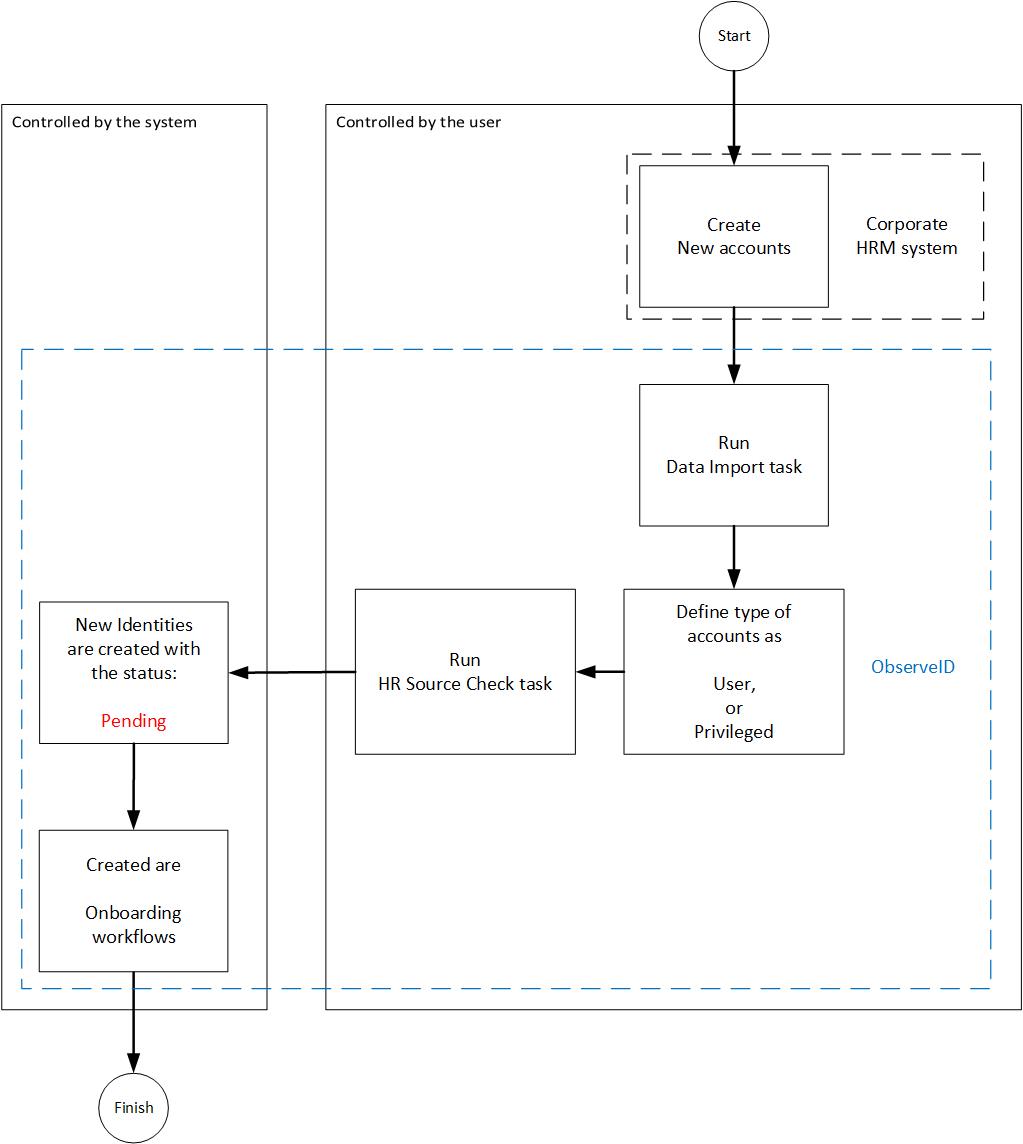 Creation of Identities scenario
The scenario of the creation of the Identities on the diagram above shows actions performed by the user, and the area of activity controlled by ObserveID for the user. The scenario involves the following systems:
- the third-party corporate HRM system;
- ObserveID
Detailed description of how to run Creation of Identities
To run the Creation of Identities, do the following:
-
In the HRM system, create as many new accounts as many Identities are required to be created.
-
In ObserveID, run the Data Import task for the HRM system integration by:
- clicking the Trigger icon for the task in the Tasks grid;
- waiting for a while and clicking the Refresh button in the header until the status of the task to change from Triggered to Idle;
- clicking the task and then clicking History to verify that the task finished successfully. Otherwise, troubleshoot and trigger the task again.
-
In ObserveID, go to the Accounts of the HRM system integration and verify:
-
that the new account(-s) have been imported from the target and now are displayed among accounts in the integration;
-
if automatically via the Customization Rule, the newly imported account(-s) should already have the User type established. Otherwise, do it manually, by selecting
Userfrom the Type dropdown list of the required accounts.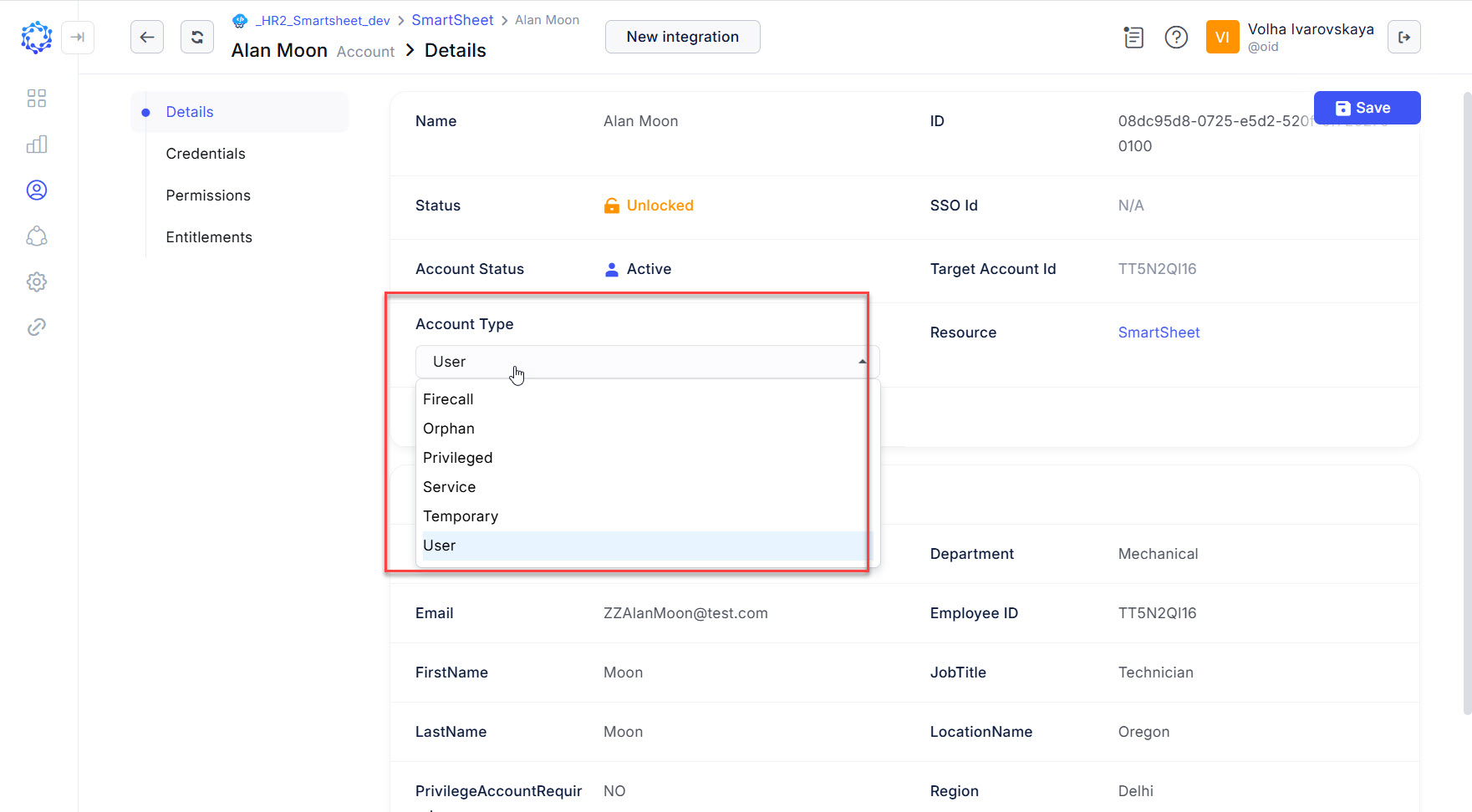 Selecting the Type of an account
-
-
In ObserveID, run the HR Source Check task by:
-
clicking the Trigger icon for the task in the Tasks grid;
-
waiting for a while and clicking the Refresh button in the header until the status of the task to change from Triggered to Idle;
-
clicking the task and then clicking History to verify that the task finished successfully. Otherwise, troubleshoot and trigger the task again.
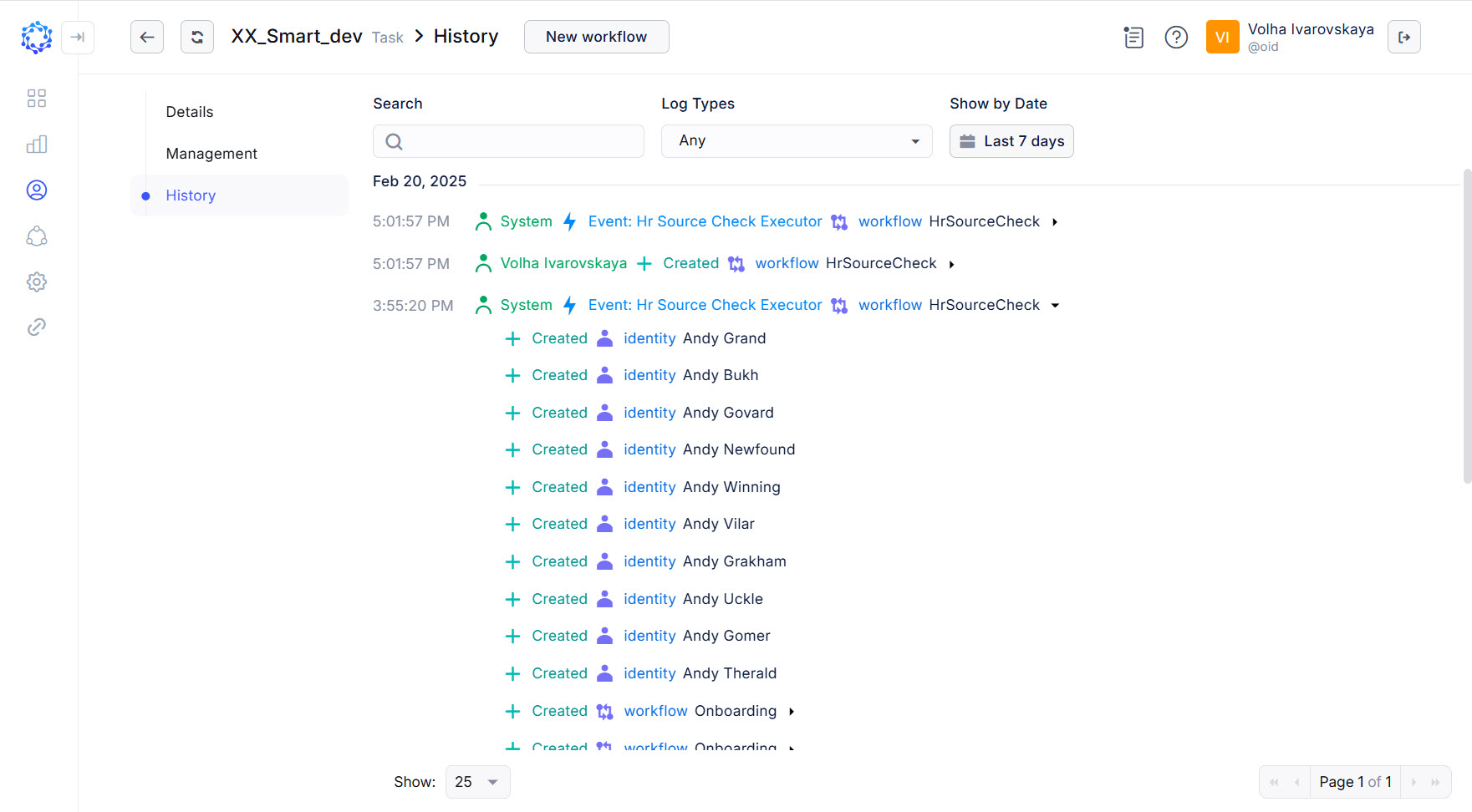 History of the HR Source Check task
-
Results of Identity Creation
Given that the HR Source Check task has finished successfully, the results of the Creation of Identities will be as follows:
- The newly created Identity(-ies) will show up in the Identities grid in: ObserveID > Dashboard > Identity Automation > Identities
- The status of the Identity(-ies) will be one of the following:
Pending- in case if the Onboarding workflow has not finished for the Identity yet;Active- in case of successfully finished Onboarding workflow.
- The Details of an Identity is the Identity Data that will display:
- the system properties established by ObserveID based on the configuration of the Identity Attributes Mapping Rule in the respective HR Source;
- the additional properties that are imported from the HRM system.
Below is an example of two Identities created from different HR Sources. The additional properties, which is the bottom section - Additional Attributes - are different for the exemplified identities, while the system properties, the upper section, show similar fields, configured with the Identity Attributes Mapping Rules of the respective HR Source integrations.
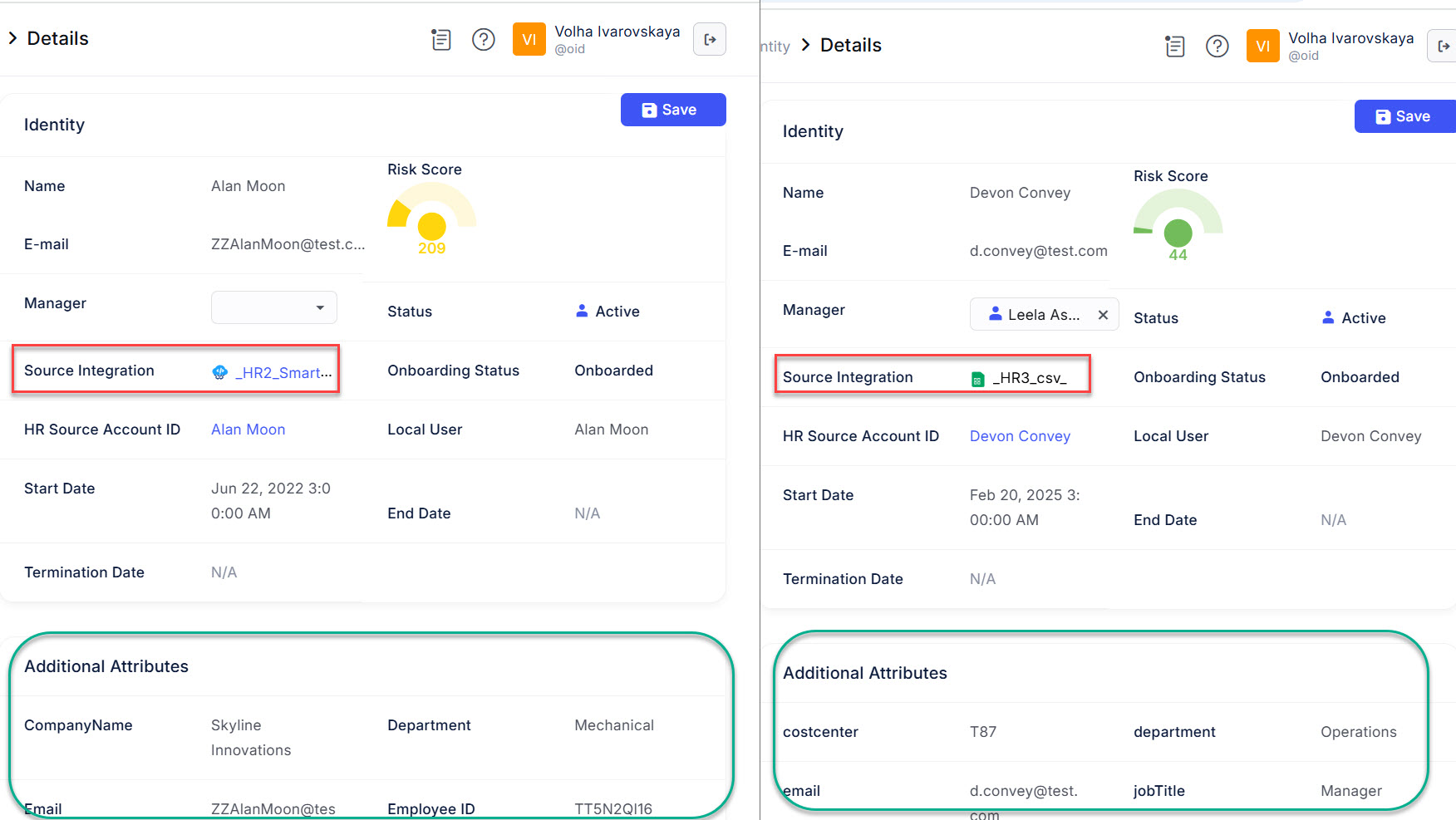 Identities created from different HR Sources