
Remove Access Detection data from Analytics
The data that comes from the Access Detection engine and get displayed in Analytics can be filtered against the Exception List policies. This filtering allows the user to define what Access Detection data should be excluded from Analytics reports. It is useful in case if other services communicate with the target, for example, system, diagnostics, monitoring agents, like: ‘telemetry’, or any other client apps. When their session data is considered as irrelevant, it can be removed from the Access Detection data in Analytics.
In this section:
- Create Exception List policy
- Parameters of Exception List
- IP Address
- <additional property>
- Start and Finish
Create Exception List policy
The Exception List policies are available for all integrations where Access Detection is supported. Access Detection is identified in the Integration Operations with the Detect Access option. If the Detect Access option is available and supported, Access Detection is available and supported for the integration.
 Linux integration as an example of where Exception List is available
The Exception List policies are opened with the Blocked and Exception Lists option in the integration menu: ObserveID > Identity Automation > Integrations > {specific integration} > Blocked and Exception Lists
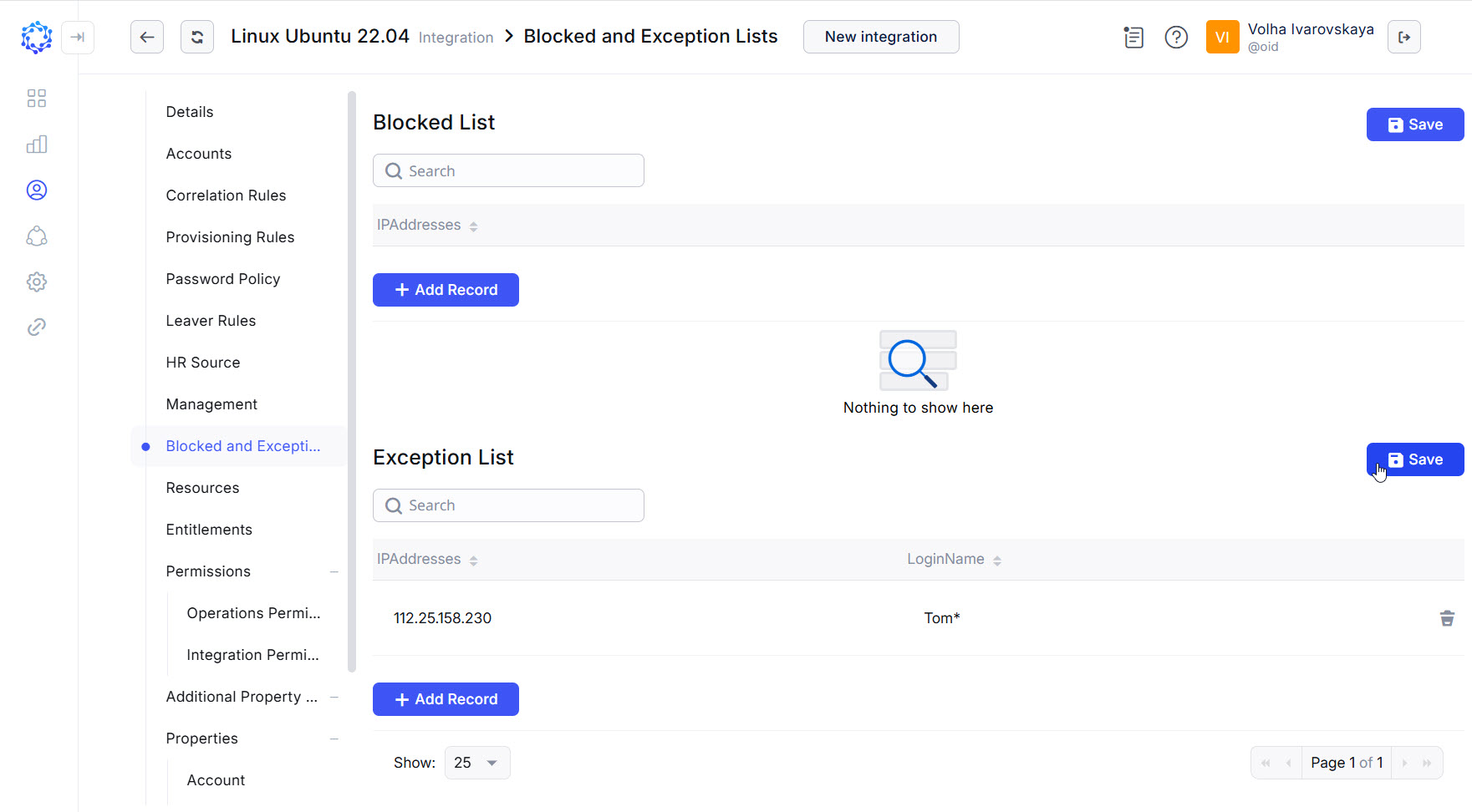 Exception List policy
Parameters of Exception List
There are two outcomes of an applied Exception List policy. One outcome is when the session is included into the scope of the data produced by Access Detection, and thus, displayed in Analytics; and the other is when the session is excluded from Access Detection, and thus, not displayed in Analytics.
The Exception List policies filter the sessions recognized by Access Detection on the integrations. And the filtration against the Exception List happens before any processing starts on the raw data. It makes the definition of a session from the collected raw data varying from integration to integration. And the parameters to describe such data are integration-specific. However, whatever the integration-specific parameters are, the method to define their values is generalized. It based on ‘string’ processing via pattern matching implemented with .NET regular expressions, see: .NET Regular Expressions
Below is the generalized parameters used to describe the raw data of Access Detection:
- IP address - to identify the host computer, or a subnet;
- <additional properties> - to identify an integration-specific definition of a session on the target;
- timestamp - to qualify the session by time limits, if any.
With the availability of different parameters, only those parameters are factored in the outcome that have been specified. Otherwise, if a parameter is null, i.e. not established, it is disregarded.
IP Address
String
Determines a host, or a subnet in a four-segment decimal format: eg. 145.11.219.4 .
The IP address parameter of an Exception policy is designed to allow patterns based on .NET Regular Expressions. Below are examples of regular expression elements, and for more details, see: .NET Regular Expressions
[0-9]- indicates the range as any single character in the range from first to last;\d- indicates decimal digit characters;0\p{P}0\p{P}0\p{P}[1-9]- indicates the subnet range, like: from 0.0.0.1 to 0.0.0.9;\p{P}- indicates any punctuation mark;
<additional property>
String
For different integrations it can be a different parameter: eg. ApplicationNameMask, LoginName, and other.
<additional property> is designed to allow patterns based on .NET Regular Expressions. Below are examples of elements to use, and for more details, see: .NET Regular Expressions
.- indicates any single character except a new line;*- indicates the occurrence of the previous character zero or more times;+- indicates the occurrence of the previous character one or more times;\w+- indicates one or more word characters;\s- indicates a white-space character;\b- indicates a word boundary;th- indicate literal characters 'th';[^uea]- a negative group of characters where each character is taken separately with the "AND" clause, like: not ‘u' and not ‘e’ and not 'a’;\bth[^o]\w+\b- a pattern that identifies any of the following words: 'thing', 'them', 'through', but not any of such words as: 'though', 'thought', because the pattern says: take all words, that begin with 'th' and then not followed with 'o'.
Start and Finish
String
To define a time limit, two parameters: Start and Finish are used. Each of the parameters is specified in a 24-hour format with the precision of up to the milliseconds, as follows: hh:mm:ss.sss.