
Set Details of Analytics report
With the Details page of the Analytics report you can set the following information:
-
the name in the Name field;
-
some description in the Description text area;
-
the Default view: either the Grid view, or the Chart view. The default view determines which of the views should open when:
-
the user clicks the report in the Analytics grid of reports;
-
the user sees the widget of the report the Dashboard.
The widget can show a grid as well as a chart. It is governed by the option that is established as the default view in the Details of the report in Analytics.
-
-
availability for other identities to see the report in their Analytics grid or select it for their Dashboard, if the Public toggle is established to the ‘Yes’ option. In case of the ‘No’ option, nobody will be able to view the report except the report owner.
-
permission for other identities to re-configure the report in their Analytics grid, if the Publicly Editable toggle is established to the ‘Yes’ option. In case of the ‘No’ option, another identity will not be able to re-configure the report. Note please, that if another identity has performed some configuration of the shared report, this identity becomes the report owner.
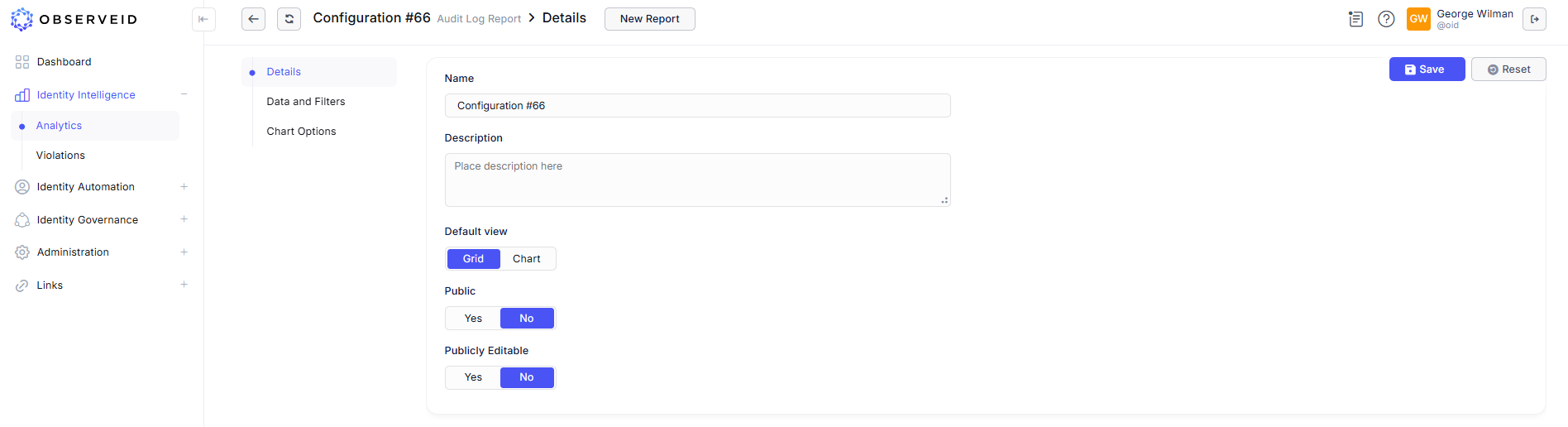 Details of an Analytics report
Whenever the updates to the report details are done, remember to click Save. If needed, the Reset button can help in reverting the changes back to the previously saved version, for example, if it is needed to start anew with the updates.