
Understand Identity
The Identities grid in: Identity Automation > Identities is the catalogue of all ever created Identities from all HR Sources. By default, active Identities are displayed. However, if needed, the dataset visible in the grid can be adjusted, and include terminated Identities, Identities managed by a specific manager, Identities with specific Additional Properties or other criteria. To manage these data, use the following capabilities:
-
enter a query in the search bar to search Identities by;
-
filter the data with any of the two types of filters:
-
click Filters and use simple filters by selecting an option from the dropdown lists; and\or
-
click More and use advanced filters by establishing a filtering condition with the search clauses in the opened Filters popup;
-
-
sort the records by a column header, and the grid will re-order Identities by that column;
-
drag-and-drop columns to set the needed order of the columns;
-
open the needed page with the pagination;
-
export the data in the grid into a CSV file;
-
select more columns and remove unneeded columns;
-
open the Details about an Identity by clicking the Identity’s name in the grid.
-
click Save to use the grid configuration later.
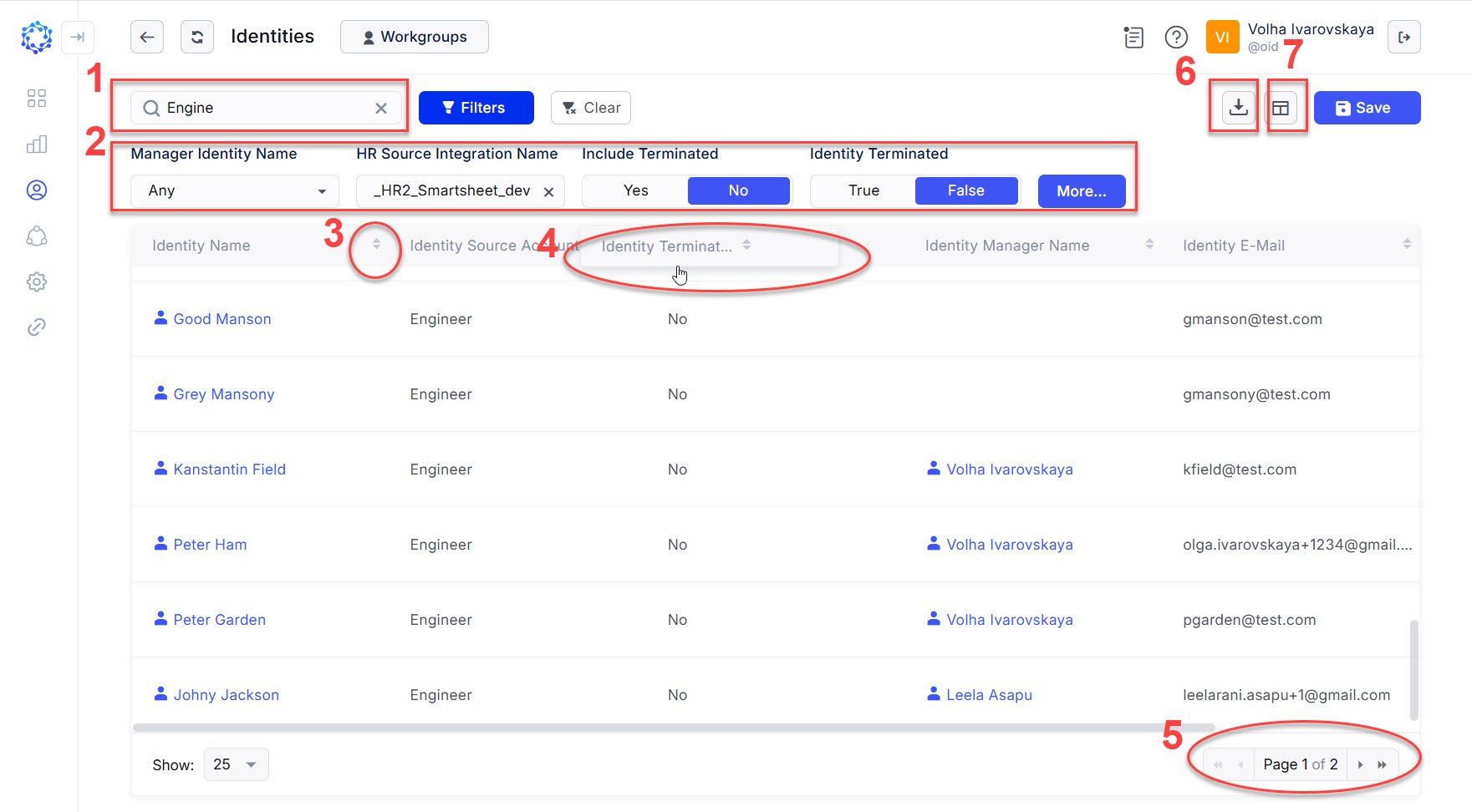 Identities grid
By default, the Identities grid shows the following information about an Identity:
- Name - the name of the Identity configured with the HR Source Identity Attributes Mapping Rule.
- Identity Onboarding Status - an Identity can have one of the statuses listed below:
- Onboarded - the Identity was successfully onboarded.
- Pending - the onboarding process for the Identity has not started, or is in progress, or failed.
- Rejected - the approval of the onboarding for the Identity finished with the Rejected decision.
- Identity Manager Name - the name of the manager of the Identity configured with the HR Source Identity Attributes Mapping Rule.
- Identity Source Account Integration Name - the name of the HR Source integration the Identity originated from.
- Identity Risk Score - the score calculated as a sum of values assigned to each occurrence of the access owned by the identity in the risk of access violation reports.
For the detailed information about an Identity and Identity access, refer to:
- additional properties imported from the corporate HRM system, see: Identity Details.
- the membership of the Identity in Workgroups, see: Identity Workgroups.
- all entitlements, including IT and Birthright roles, the Identity has in all integrations, see: Identity Detected Access.
- all accounts the Identity has in all integrations, see: Identity Accounts.
- the log of records storing all activity performed by and\or for the Identity, see: Identity History.