
Revoke Roles
When an IT Manager revokes a role from an Identity, the Identity gets a record in the Assigned Access that the role was revoked; and the role entitlements are removed from the accounts of the Identity. For the role which provides access to one integration, when the Identity’s account in this integration is deprovisioned of the role access, the role gets revoked too.
There are two statuses that describe the availability of a role: if it is assigned, and if it is detected. A multiple-integration role is considered to be assigned but not detected if at least one of the accounts bundled together into the role access has lost the role entitlements.
Revoking a role does not delete the affected account, but only removes the role entitlements from that account. However, in case when the Identity has two Roles, and both Roles provision the same Entitlement A, when one of the Roles is revoked, then the Entitlement A will stay provisioned. Below is an overview of cases and tools that allow an IT Manager to revoke a Role.
In this section:
- Birthright Roles
- Role Deletion revokes BR Role
- Offboarding revokes BR Role
- IT Roles
- Role Deletion revokes IT Role
- Account Removal revokes IT Role
- Offboarding revokes IT Role
Birthright Roles
To be assigned, the Birthright Roles require for the Assignment Rules to be fulfilled and determine the condition of the role assignment. If the Identity has experienced a few changes and does not meet the condition anymore, the role gets revoked within the next run of the Identities Update workflow. At this point three actions happen: verification of the condition, providing a record that the role is revoked, and removing the entitlements of the role. As a result, the birthright role gets the status: revoked, not detected.
A Birthright Role is also revoked on termination: when either the Identity is terminated, or the Role is terminated. Below is more information about each case and its outcome.
Role Deletion revokes BR Role
A BR Role is always revoked for Active Identities with the Role Deletion workflow. The workflow deletes the Role, and also revokes the role access from all Identities who have had the role. As a result, the role assignment is removed, the entitlements of the role are deprovisioned from the accounts, while the accounts continue to exist for the Identities.
Offboarding revokes BR Role
A BR Role is revoked for Terminated Identities with the Offboarding workflow. The workflow can execute the deprovisioning of the role access differently for different accounts. It is based on what deprovisioning options are configured for each specific integration in its integration-specific Leaver Rule. The options can be any of the following:
- to revoke the BR Role and delete the account;
- to revoke the BR Role, remove entitlements and lock the account;
- to revoke the BR Role and lock the account.
For more details, refer to: Off-board Identities
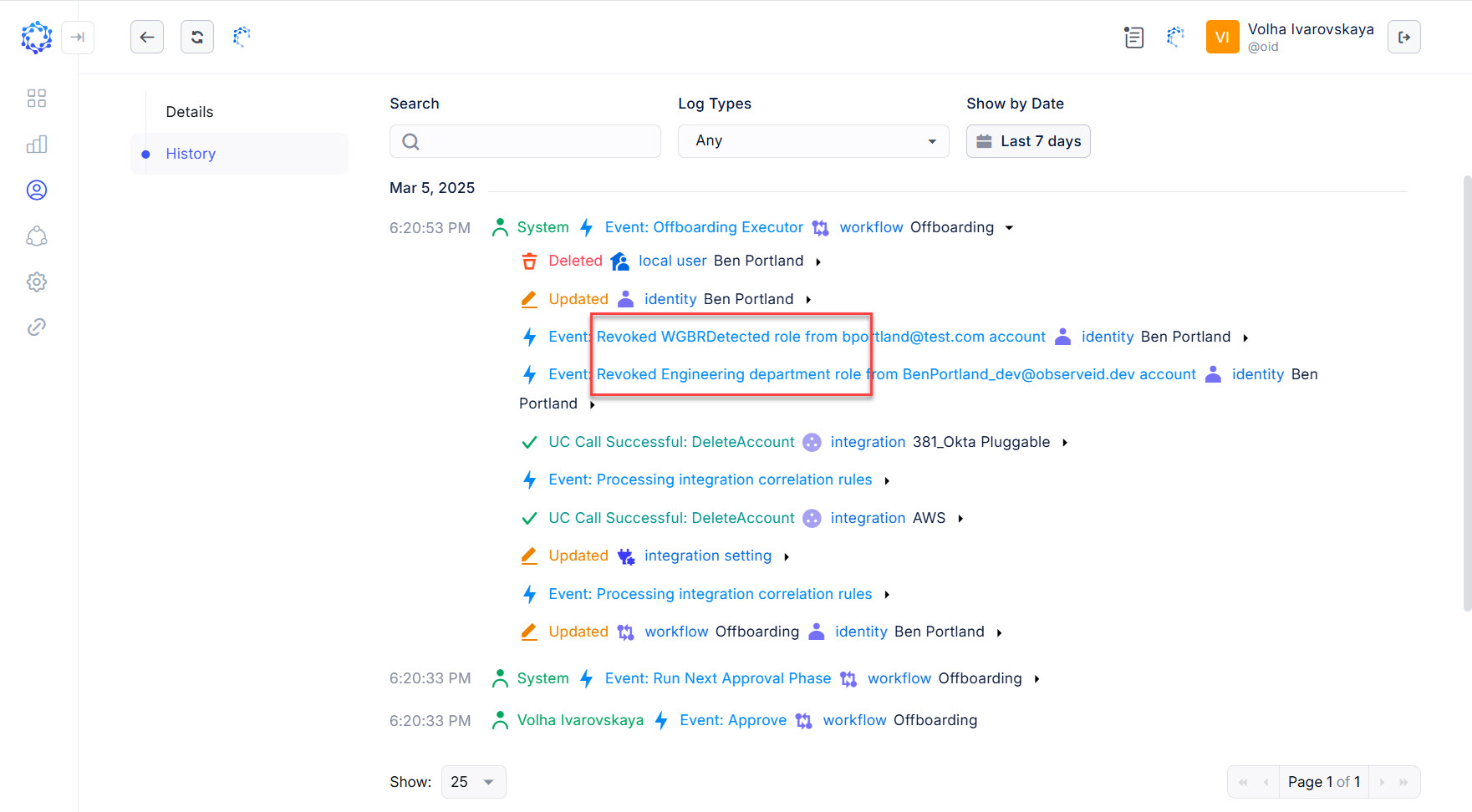 Example of Offboarding revoking two BR Roles
IT Roles
IT Roles have no dependencies on anything except the IT Manager’s desire to revoke the role access, and it can be revoked as needed. There are different tools that can revoke an IT Role. With a one-integration IT Role being assigned in the same manner as any other entitlements are assigned, the same way it is removed. For example, a one-integration IT Role can be assigned with the Manage Access workflow, and with the Manage Access workflow it can be revoked. As a result, the IT Role will have the status as revoked, and not detected.
The assignment of the multiple-integration IT role is removed when all the entitlements of the role are removed. For example, if the Manage Access revokes some of the entitlements included into the role, the role status will be as assigned and not detected. Below is an overview of cases when an IT Role is fully revoked together with all entitlements included into it, and have the status as revoked and not detected.
Role Deletion revokes IT Role
An IT Role can be revoked for Active Identities with the Role Deletion workflow. The role access is revoked for all Identities who have had the role assignment when the IT Role is deleted. Deleting the role, the workflow also removes all role entitlements from all accounts of all affected Identities, while the accounts continue to exist.
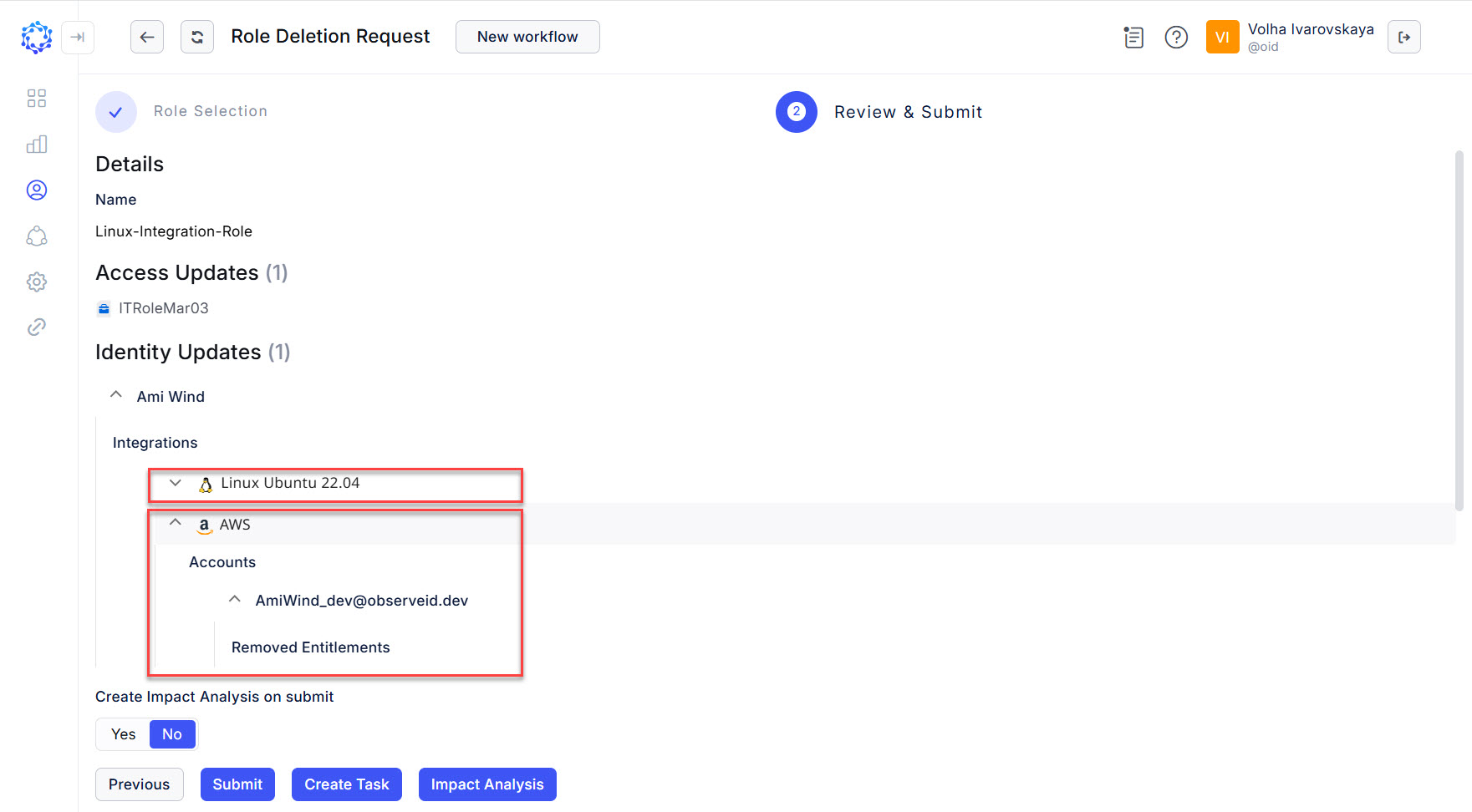 Role Delete revokes the role access from the Identity
Account Removal revokes IT Role
An IT Role can be revoked for Active Identities with the Account Removal workflow. When an account where the role access was provisioned for an Identity is deleted, then the role assignment is also deleted.
In case of multiple-integration IT Roles, it is also enough to delete one account when the role bundle access looses its completeness, and thus, does not represent the IT Role anymore, and thus, the role is displayed as not detected. However, for the role assignment to be revoked with the Account Removal workflow, it is needed to delete all accounts that represent the access of the multiple-integration role.
Offboarding revokes IT Role
An IT Role is revoked for Terminated Identities with the Offboarding workflow. For different integrations the deprovisioning of the IT Role access can be implemented differently. It is determined with the integration-specific Leaver Rule, which can have any of the following options:
- to revoke the IT Role and delete the account;
- to revoke the IT Role, remove entitlements and lock the account;
- to revoke the IT Role and lock the account.