
Track records about role based changes
The role-based updates of access include any of the following: Roles granted and\or revoked; entitlements granted and\or revoked; and accounts created, updated, or deleted. For example, if the condition has changed, then who will get the Role; or if the role was added with an Entitlement X, then who will be able to perform the action allowed by the Entitlement X; or if some roles provision access into the same target system, then how many accounts in the integration it is expected to manage? There are tools to track the changes. Below is an overview of tools to use when you consider a specific perspective of the change related to roles, entitlements, or accounts.
In this section:
- Role changes
- Detected Roles in Analytics
- Assigned Access in Identities
- Detected Access in Identities
- Entitlement changes
- Detected Entitlements in Analytics
- Detected Access in Identities
- Entitlement Identities in Integrations
- Account changes
- Accounts report in Analytics
- Accounts grid in Identities
- Mind Map in Identities
Role changes
To get the information about who a Role is assigned to, the following tools help to detect:
|
Tool |
Available in: |
Information about |
|
Detected Roles |
Analytics area |
Identities with a Role assignment |
|
Assigned Access |
Identities area |
Roles assigned to a specific Identity |
|
Detected Access |
Identities area |
Roles detected for a specific Identity |
Detected Roles in Analytics
The Detected Roles report helps to identify all cases of when an Identity has a role assignment based on the condition of a specific value in the Additional Properties. The Include Terminated toggle helps for the analysis of the assignments that resulted from the update of the Identity Properties. All assignments can be filtered by the user-defined criteria; by managers, by the type of the role, etc. One can sort the grid by any column: dates, role names; identity names and other.
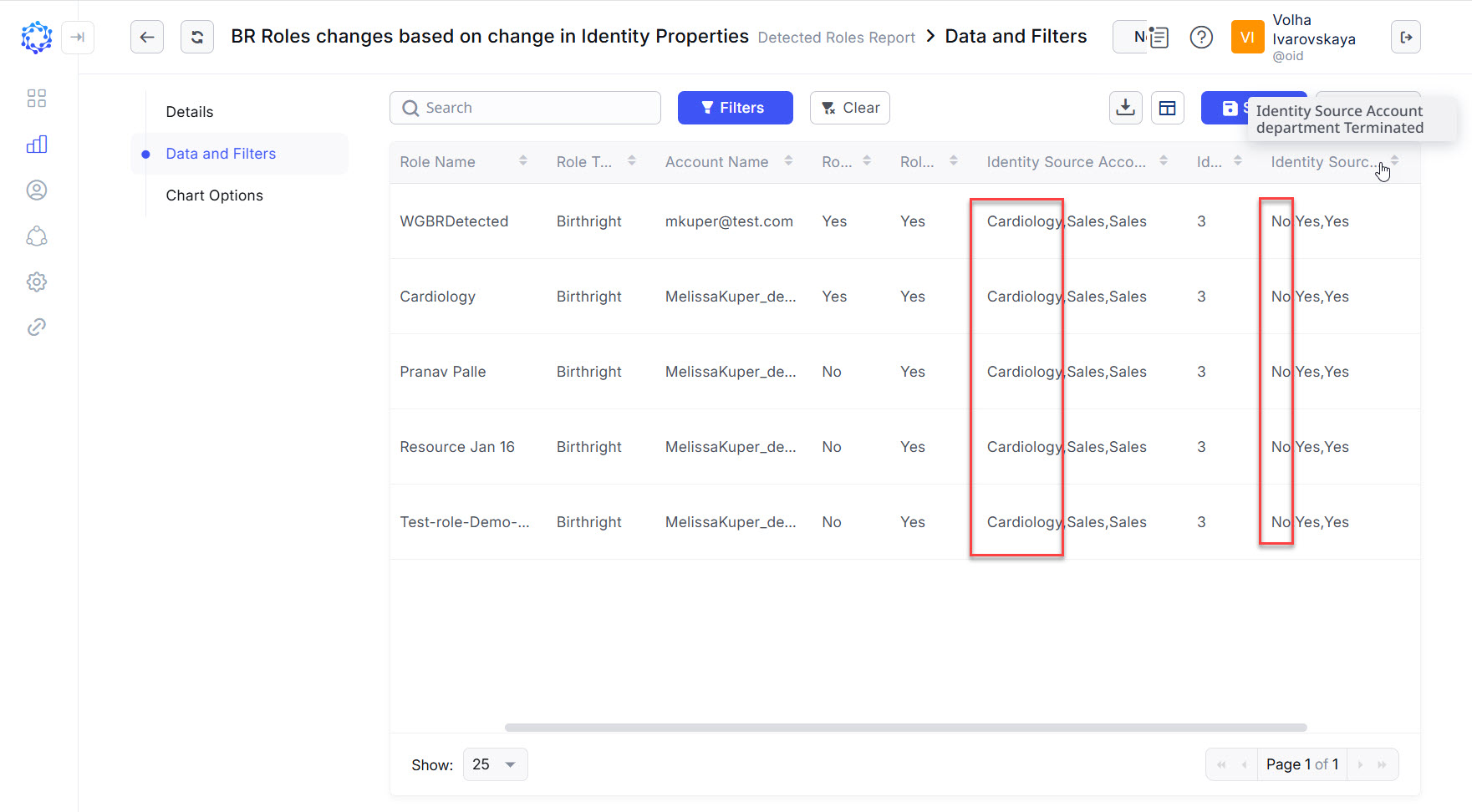 Example of the actual value for the Department property versus previously established values
Assigned Access in Identities
The Assigned Access list provides a register of all records when a Role has ever been directly assigned or revoked to\from an Identity by means of ObserveID tools. If some access was granted outside of ObserveID, for example, directly on the target, it is reflected in the Detected Access. The Assigned Access shows only assignments provisioned through ObserveID directly to the Identity. It is possible to enter the name of the required Role in the search bar and view all assignments made for current Identity and involving the Role.
Detected Access in Identities
The Detected Access grid shows all existing access the Identity is detected to have at the current moment. There are direct assignments made via workflows. There are indirect cases when a Role is received through inclusion of one Role into another Role (i.e. Role Hierarchy), or when a Role was not assigned, but the Identity has such a bundle of entitlements provisioned which altogether make up the role access. The grid of entitlements can be sorted by some columns and\or filtered by such attributes as: integration and\or resource name, tags, permission type and other.
Entitlement changes
To get the information about who an Entitlement is assigned to, use the following tools:
|
Tool |
Available in |
Information about |
|
Detected Entitlements |
Analytics area |
Assigned Entitlements by the Identity, Integration, or Role |
|
Detected Access |
Identities area |
Detected Entitlements filtered by the Integration for one specific Identity |
|
Entitlement Identities |
Integrations area |
Identities assigned with a specific Entitlement |
Detected Entitlements in Analytics
The Detected Entitlements report in Analytics can be used for a quick look at who and how much access was provided on a specific target. It is possible to skim through the Entitlements of one Identity and\or the Entitlements of another Identity and to verify if the access granted was sufficient and enough for the given purpose; and\or for example, if the Role updates make the intended impact on the range of access provided to a specific number of Identities on one or some resources of the case.
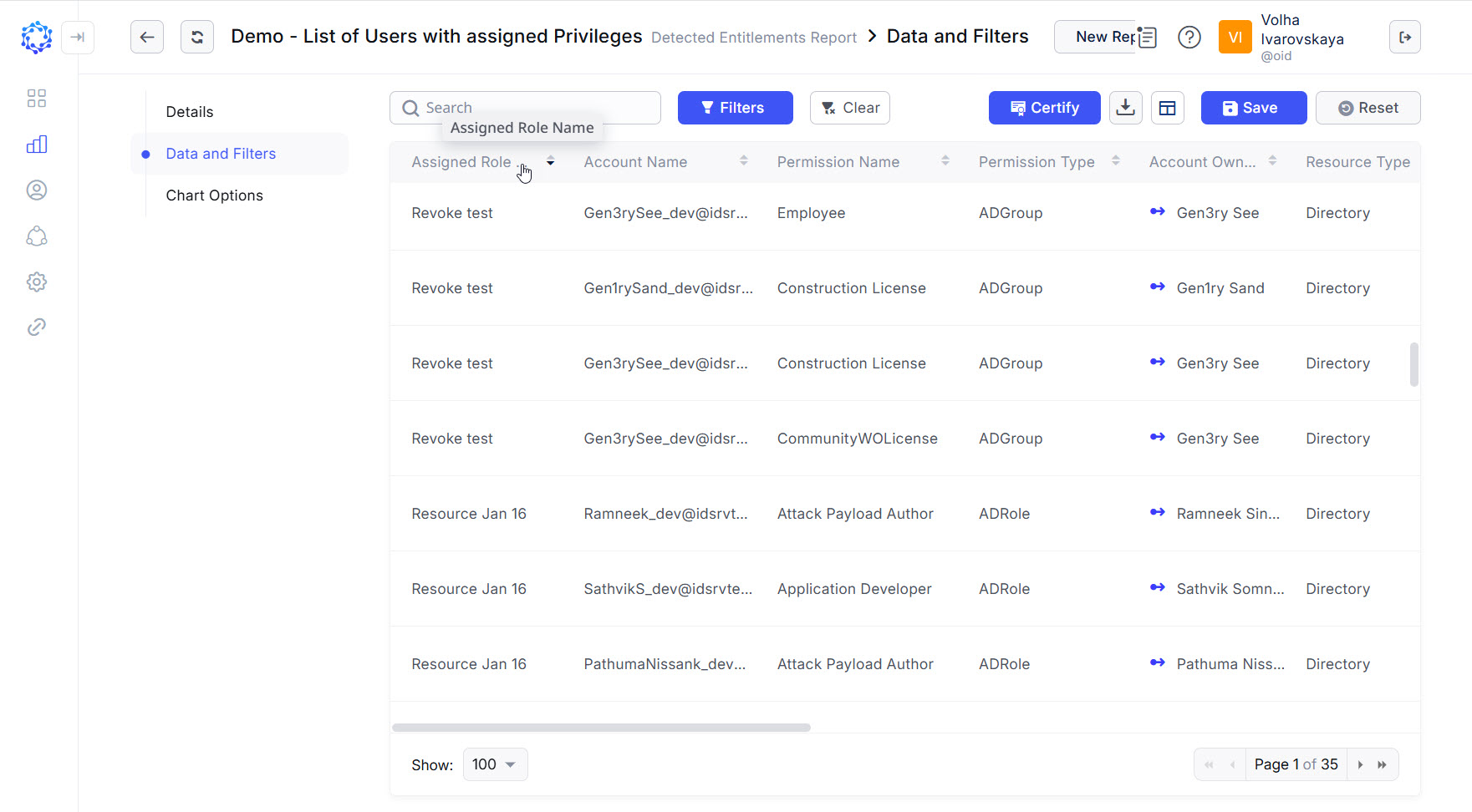 Example of Detected Entitlements report
Detected Access in Identities
The Detected Access grid can play a key role in the analysis of how much access the given Identity was provided in relation to one or another selected resource. The Entitlements listed for the Identity can be filtered, for example, by permission type to get the idea of how far-reaching they can act: whether it is only a specific database or all databases on the server. The Detected Access shows the current state of all available Entitlements, including implicit entitlements, inherited, or acquired ones outside of ObserveID.
Entitlement Identities in Integrations
In case of the especially sensitive Entitlement, for example, if compared with the ability to view something versus to delete something, it makes sense in certain cases to have an exact list of people provisioned with such a specific Entitlement. The Identities on the list can be filtered by the HR Source integration, the account type that grants the Entitlement, or by the manager or some managers.
Account changes
To get the information about whether an Account is created, updated, or deleted, use the following tools:
|
Tool |
Available in |
Information about |
|
Accounts report |
Analytics area |
Accounts filtered by selected Identities, HR Source Account Properties, Integrations |
|
Accounts grid |
Identities area |
All Accounts of a specific Identity |
|
Mind Map View |
Identities area |
Mind Map of Accounts and Role Assignments of a specific Identity |
Accounts report in Analytics
Knowing a list of affected Identities, after for example, a Role was updated; and knowing how the Role was updated, for example, the Entitlements of what integration were granted\revoked; then by using the Accounts report it is possible to have an account list of all affected Identities, one by one. Such an analysis can reveal inconsistencies between the expected number of accounts per Identity per Integration and the actual number of accounts owned by some specific Identities; between the expected and actual type of the accounts; etc.
Accounts grid in Identities
The Accounts grid opened for a specific Identity can shed more light on why the detected inconsistencies exist; what causes them; if the accounts are actually workable or they are locked, and for example, were used a long time ago under special circumstances; etc. If there are lots of accounts, it is possible to use the search to get to one needed quickly.
Mind Map in Identities
The same account can have Entitlements originated from different assignments. The Mind Map View of the Assigned Access helps to track what Role provides what Entitlements, as well as to get an overarching understanding of the range in the access that a specific Identity has at the current moment. The Mind Map View skips all revoked access and displays only those Entitlements that are actual at the current moment.