
Application Build 3.7 and UC 3.4
June 2026
Overview / Summary
Release 3.7 focuses on improving security, performance, usability, and governance across the ObserveID platform. It introduces configurable MFA enforcement, enhanced local user credential management, improved visibility into offboarding activities, faster retrieval of audit and history records, and more powerful certification management capabilities. In addition, the release delivers user interface enhancements, improved Remote Connect functionality for RDP and SSH sessions, and expanded AWS and Atlassian integration capabilities, providing richer identity data, broader governance coverage, and a more efficient administrative experience.
Key feature enhancements include:
- Logs Retrieval: Faster date-based log retrieval
- MFA Enforcement: Configurable MFA enforcement with a grace period
- Local User Management: Enhanced password management
- Offboarding: Detailed visibility into terminated access
- Certifications: Advanced filtering and customizable grid
- UX / UI Enhancements: JIT request terminology, streamlined entitlement selection, and enhanced dashboard visualizations
- Remote Connect (RDP/SSH): Improved file transfer reliability and adaptive display scaling
- Integrations: Enhanced AWS and Atlassian integrations
New Features & Enhancements
Faster Log Retrieval by Date
Time-based partitioning has been introduced for the Logs database to improve the performance of log retrieval operations across the platform.
-
Because log histories and the Access Log are typically filtered by a date range, the time filter is now used to access only the relevant database partitions. This optimization reduces the volume of data scanned during queries, improving the responsiveness of history pages, including Request History, Identity History, Integration History, and other log-based views.
-
As a result, log records within the requested date range are retrieved and displayed more efficiently, especially in environments with large volumes of historical data.
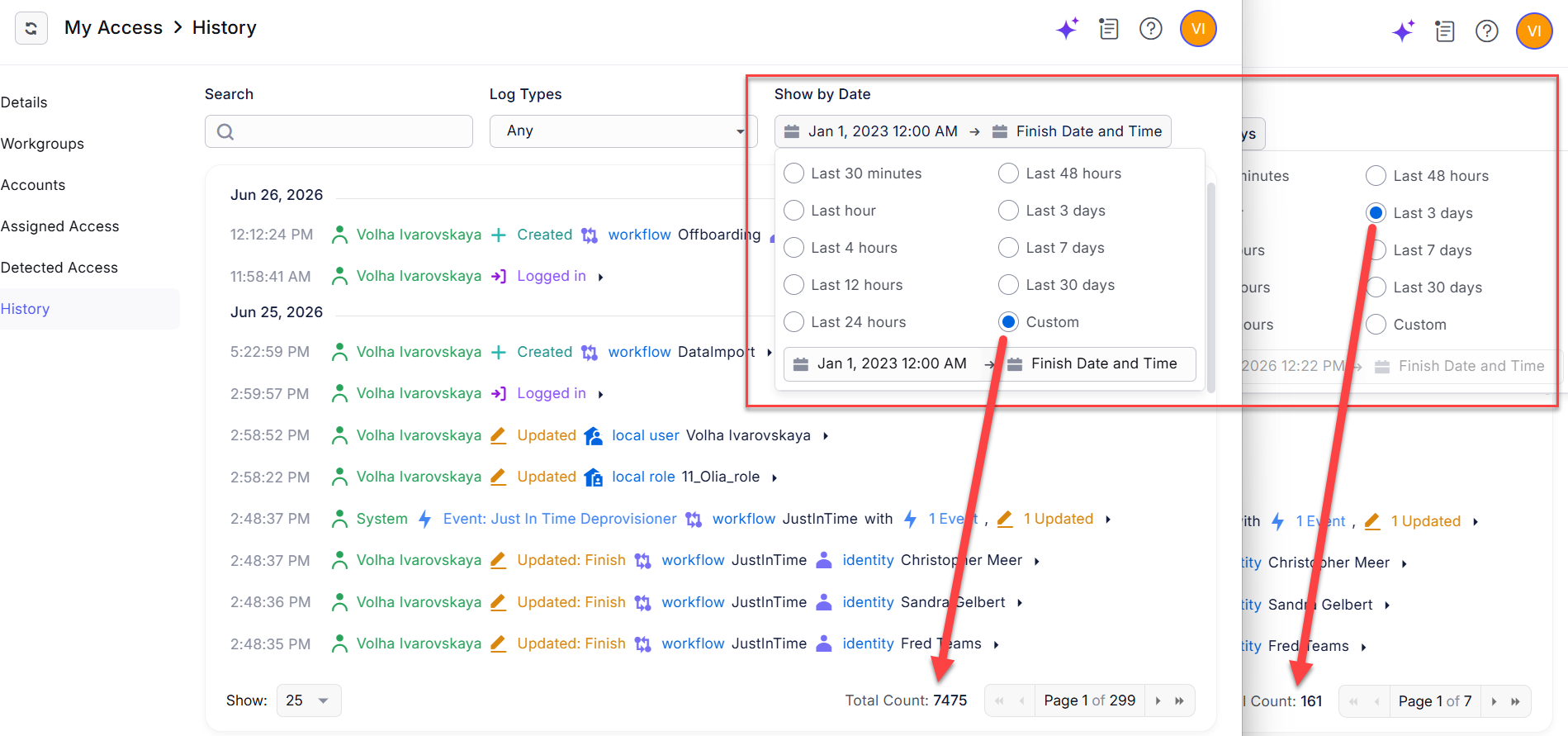 Retrieval of data by time interval
MFA Enforcement
New authentication policy options enable administrators to enforce multi-factor authentication (MFA), providing stronger identity assurance for user sign-ins.
-
When MFA enforcement is enabled, users are required to complete multi-factor authentication each time they sign in to ObserveID. To facilitate adoption, administrators can configure a grace period during which users may temporarily skip MFA before enforcement becomes mandatory.
-
For recovery and support scenarios, administrators can review an individual user's sign-in status and reset the user's MFA enrollment or enforcement state, allowing the user to reconfigure multi-factor authentication if necessary.
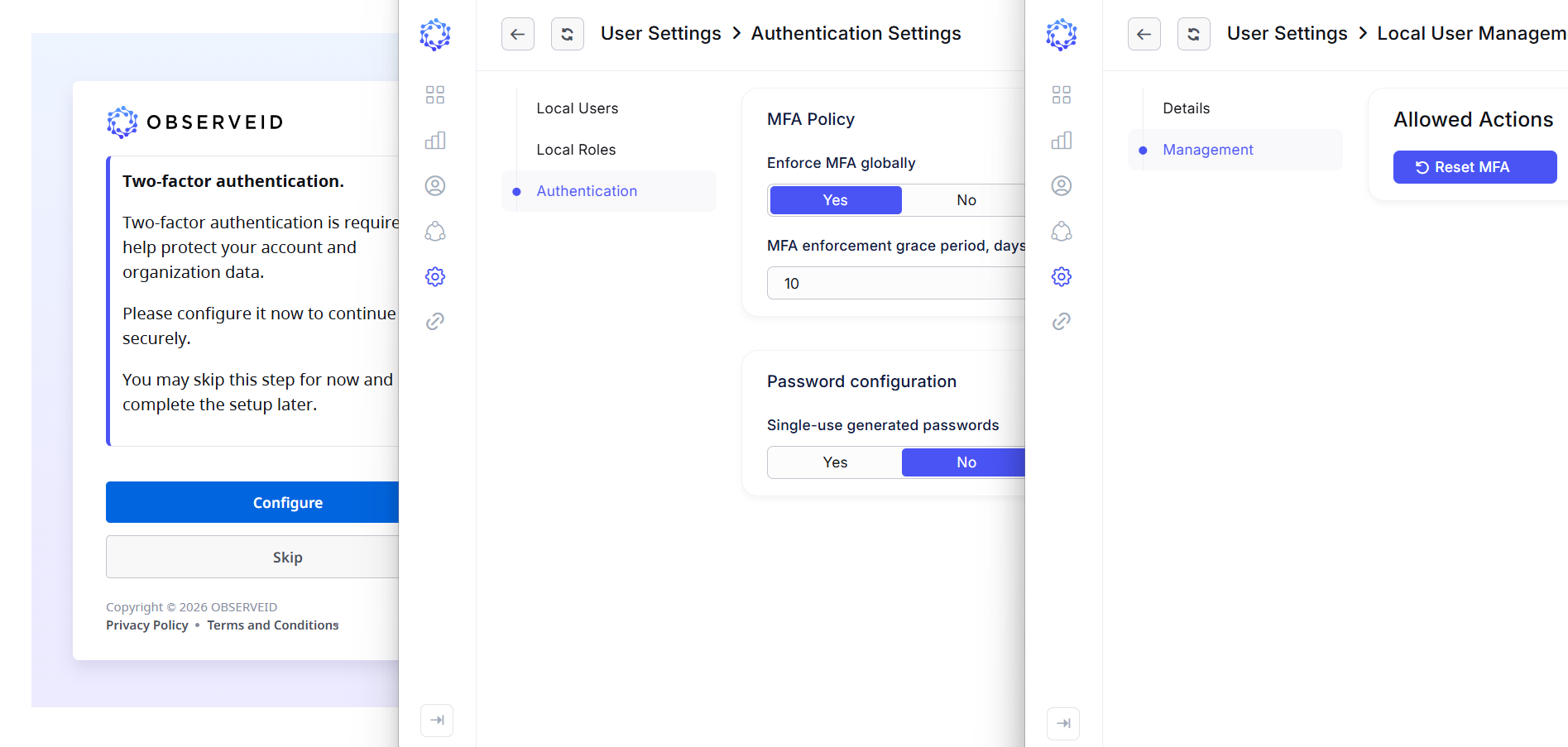 Multi-factor authentication enforcement
Local User Password Management
Password management for local ObserveID users has been enhanced with the ability to require newly created users to change their password upon their first sign-in.
- When the Single-use option is enabled, users are required to replace their temporary or administrator-assigned password before accessing the application. This enhances account security by ensuring that initial credentials are used only once.
- In addition, configurable email notifications have been introduced to notify designated recipients whenever a new local user account is created. Local user accounts are created through the Identities Update request, which supports bulk user provisioning. Notifications are generated for each successfully created user account.
Terminated Access Listed in Offboarding Details
The details of the Offboarding request have been enlarged to provide a comprehensive list of access revoked during the deprovisioning process. This information can be included in offboarding email notifications.
-
The enhanced request details provide complete visibility into the accounts, entitlements, and access assignments removed during identity offboarding. This information improves auditability, simplifies verification of deprovisioning activities, and enables designated recipients to receive detailed offboarding results as part of the notification process.
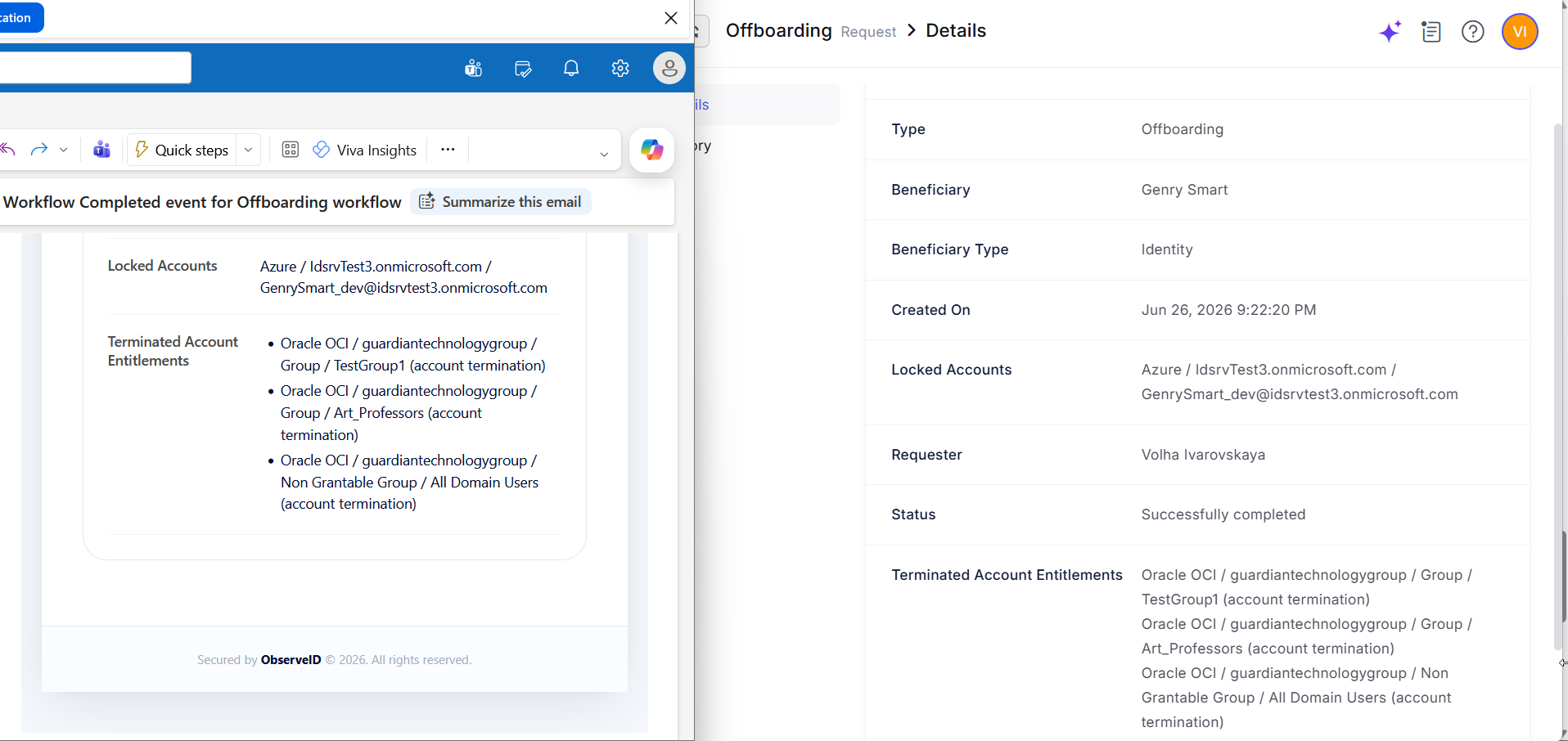 Email with terminated access
Enhanced Certifications Grid Filtering
Advanced filtering has been added to the Certifications grid, making it easier to search for and manage certification campaigns based on properties such as Staging, Completion Status, Start Date, and other available attributes. The grid also now supports customizable columns, enabling users to reorder columns and optimize the layout for their preferred workflow.
UX / UI Enhancements
This release introduces several user experience and interface improvements designed to simplify navigation, streamline common workflows, and improve the overall usability of the platform.
-
Temporary Access Request renamed to Just-in-Time (JIT) Request – The Temporary Access Request (TAR) has been renamed to Just-in-Time (JIT) Request to better reflect its purpose and align with industry terminology.
-
Simplified entitlement selection – Environment information is no longer displayed during entitlement selection in access requests, reducing visual clutter and simplifying the selection process.
-
Enhanced dashboard visualizations – Pie, line, and bar chart widgets have been refreshed with an updated visual design, providing a cleaner, more consistent, and user-friendly dashboard experience.
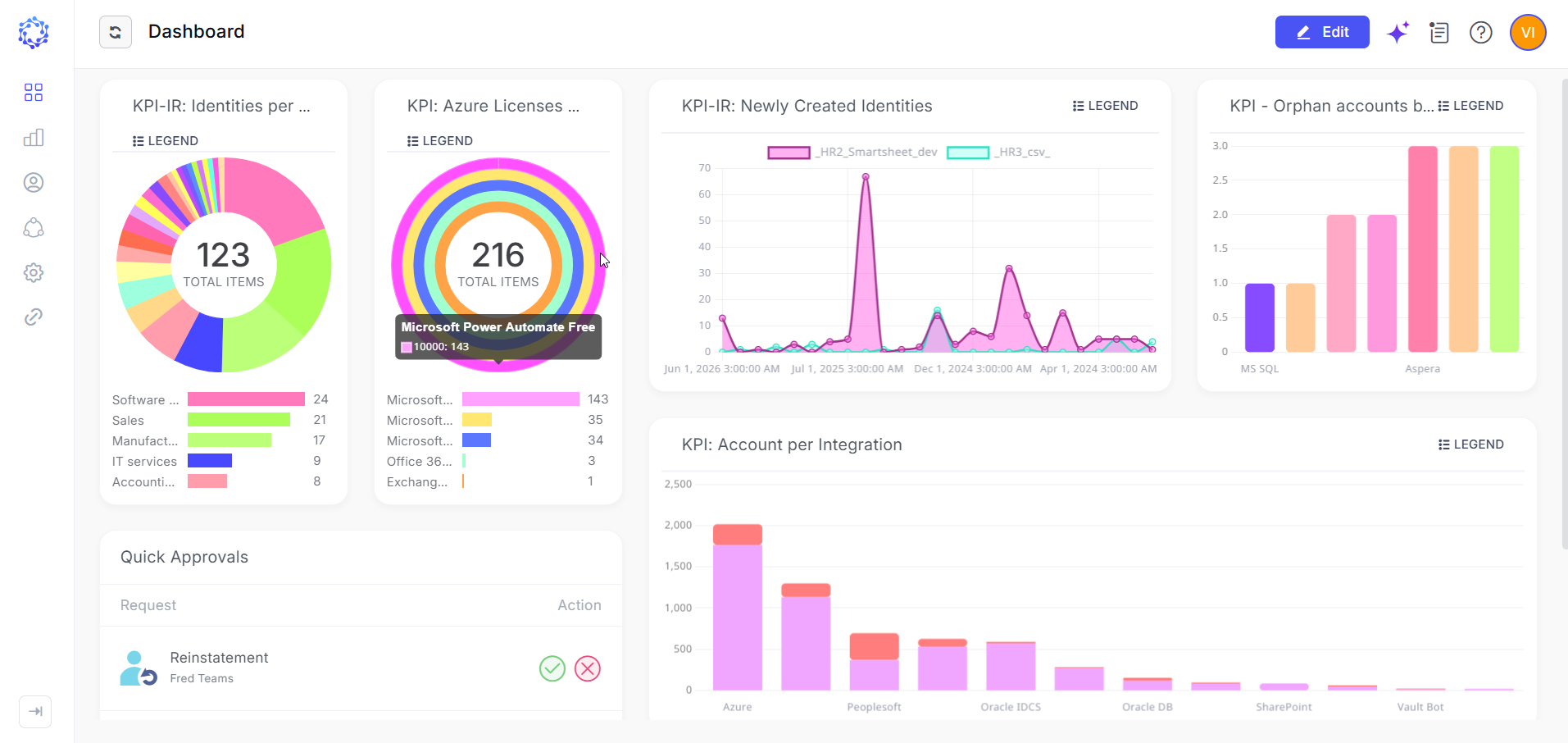 Enhanced dashboard visualizations
RDP and SSH Enhancements
The Remote Connect capability for RDP and SSH has been enhanced to improve usability and reliability in scenarios such as unstable network connections and high-resolution client displays.
- Improved RDP file transfer reliability – For RDP connections to remote Windows hosts, the file transfer workflow now automatically reinitializes the connection when the destination download folder is selected. This improves the reliability of file transfers in environments with intermittent network connectivity.
- Automatic display scaling – For both RDP and SSH sessions, the client display resolution is now detected automatically. Remote session rendering dynamically adjusts pixel density, scaling, and font sizes to provide an optimized viewing experience across a wide range of display resolutions and screen sizes.
Specific Integration Updates
-
AWS integration
The AWS integration has been significantly enhanced by expanding the scope of data aggregated from the target environment and adding support for importing federated users in addition to native IAM users. The integration now supports a broader range of AWS resources, including AWS Lambda, AWS CodePipeline, dynamically discovered resources through Resource Explorer 2, and Amazon Bedrock resources, such as foundation models, agents, runtimes, guardrails, inference profiles, and other AI-related resource types.
-
Atlassian integration
The Atlassian integration has been enhanced with a Project Key filter, enabling administrators to precisely define the scope of data aggregated from the target environment. By specifying one or more Jira project keys, the integration retrieves project-specific roles and issues (if enabled) only for the selected projects. In addition, the integration now aggregates and displays an expanded set of properties for Atlassian accounts and groups, providing richer identity and access data for analysis, reporting, and governance.
Affected Components & Modules
- Authentication
- Local User
- Email Notification
- Email Template
- Offboarding
- Certifications
- Dashboard
- Remote Connect
- Logging
- AWS integration
- Atlassian integration
Note:
The release will be deployed during non-business hours to minimize disruption. Downtime is expected to be less than five minutes, and users are unlikely to experience any noticeable interruption.
References & Support
For detailed instructions or additional technical assistance, please contact your ObserveID support representative at [email protected].
Thank you for choosing ObserveID!