
Atlassian Schema of Integration Data
The integration data schema defines the structure of the data imported by the Atlassian integration. The primary data model entities include Accounts, with mandatory and optional attributes; Resources, categorized by resource type; and Entitlements, categorized by permission type.
Accounts
Atlassian Users— External and Managed Users in all directories — are retrieved from Atlassian as the source system during the integration data aggregation process. These users are then normalized and mapped to Account objects within the Atlassian integration data model.
Within the integration interface, the aggregated accounts can be accessed at: ObserveID > Identity Automation > Integrations > {specific Atlassian integration} > Accounts
The schema of account additional properties is presented in the table below. Properties that are required when creating an account are marked as Required in the On Creation column. Properties that are optional at account creation, or that can be modified later, are marked as Allowed in the On Creation column or in the On Update column, respectively.
Provisioning Rules are used to define the value of a property during account creation or update when the property is required at creation or allowed to be updated. N/A indicates that no provisioning rule is defined for the property.
Custom properties are not listed below and can be added on an ad hoc basis together with the corresponding provisioning rule.
|
Account Property |
Type |
Description |
Provisioning Rule |
On Creation |
On Update |
|
Name |
String |
The Atlassian account name. |
Required |
Required |
N/A |
|
AccountId |
String |
The account ID of the user, which uniquely identifies the user across all Atlassian products. |
N/A |
N/A |
N/A |
|
AccountStatus |
String |
The lifecycle status of the account. Valid values:
|
N/A |
N/A |
N/A |
|
AccountType |
String |
The type of account.Valid values: |
N/A |
N/A |
N/A |
|
Active |
Boolean |
Whether the user is active. |
N/A |
N/A |
N/A |
|
AddedToOrg |
DateTime |
The ISO-8601 date and time the user was first added to any directory the admin is permitted to view in the organization. |
N/A |
N/A |
N/A |
|
Avatar |
String |
The URL of the user's public avatar. |
N/A |
N/A |
N/A |
|
ClaimStatus |
String |
The claim status for the user account. Valid values: |
N/A |
N/A |
N/A |
|
DeactivatedOn |
DateTime |
|
N/A |
N/A |
N/A |
|
Department |
String |
The department in which the user works. |
Available |
N/A |
Allowed |
|
DisplayName |
String |
The display name of the user. Depending on the user’s privacy setting, this may return an alternative value. |
N/A |
N/A |
N/A |
|
|
String |
The email address for the user. |
Required |
Required |
N/A |
|
EmailVerified |
Boolean |
The email verification status of the user. If true, the user verified their email after creating their account. |
N/A |
N/A |
N/A |
|
ForDeletion |
Boolean |
Indicates whether or not an account is scheduled for deletion. |
N/A |
N/A |
N/A |
|
JobTitle |
String |
The job title of the user |
Available |
N/A |
Allowed |
|
Locale |
String |
An IETF BCP 47 locale string |
Available |
N/A |
Allowed |
|
Location |
String |
The physical location of the user. |
Available |
N/A |
Allowed |
|
ManagementSource |
String |
How a managed account was added to a directory.
If Valid values: |
N/A |
N/A |
N/A |
|
MembershipStatus |
String |
A list of membership statuses. Valid values: The membership status is the status of the user account in the organization.
|
N/A |
N/A |
N/A |
|
MfaEnabled |
Boolean |
Whether or not an account has two-step verification enabled. If |
N/A |
N/A |
N/A |
|
Name |
String |
The full name of Atlassian user. |
Available |
N/A |
Allowed |
|
Nickname |
String |
A nickname for the user in content references to the user. Constraints
|
Available |
N/A |
Allowed |
|
Organization |
String |
The organisation to which the user belongs. |
Available |
N/A |
Allowed |
|
Picture |
String |
The URL of the user's profile picture. |
N/A |
N/A |
N/A |
|
Resources |
Float |
The number of resources the user has roles assigned to, linked to the directories the requestor can manage. |
N/A |
N/A |
N/A |
|
Self |
String |
The URL of the user. |
N/A |
N/A |
N/A |
|
Status |
String |
The status for the user account. Valid values: This status is a composite of
|
N/A |
N/A |
N/A |
|
TimeZone |
String |
The time zone specified in the user's profile. If the user's time zone is not visible to the current user (due to user's profile setting), or if a time zone has not been set, the instance's default time zone will be returned. |
Available |
N/A |
Allowed |
Resources
The resource objects are imported from Atlassian Jira and displayed as the resources in ObserveID. The attributes of each resource type that a specific resource belongs to are displayed as Additional Properties objects of the Resource.
|
Resource Type and its Properties |
Property Type |
Description |
|
Atlassian resource type |
|
It is the Atlassian software as the root resource. No additional properties for it. |
|
JiraProject resource type |
|
It is a project created in the Jira product of Atlassian. |
|
Description |
String |
A brief description of the project. |
|
Id |
String |
The ID of the project. |
|
Is Private |
Boolean |
Whether the project is private from the user's perspective. This means the user can't see the project or any associated issues. |
|
Key |
String |
The key of the project. |
|
Lead Account Id |
String |
The account ID of the user, which uniquely identifies the user across all Atlassian products. For example, 5b10ac8d82e05b22cc7d4ef5. Required in requests. |
|
Lead Display Name |
String |
The display name of the user. Depending on the user’s privacy setting, this may return an alternative value. |
|
Project Keys |
Strings |
Project keys must be unique and start with an uppercase letter followed by one or more uppercase alphanumeric characters. The maximum length is 10 characters. |
|
Project Type Key |
String |
The project type of the project. Valid values: |
|
Simplified |
Boolean |
Whether the project is simplified. |
|
Status |
String |
Project status:
Valid values: |
|
Style |
String |
The type of the project. Valid values: |
Entitlements
The permission objects are imported from Atlassian Jira and displayed as the entitlements in ObserveID. The attributes of each permission type that a specific entitlement belongs to are displayed as Additional Properties objects of the Entitlement.
|
Permission Type and Permission Type Properties |
Property Type |
Description |
|
Group permission type |
|
Groups are used to manage users within the organization who need the same permissions or restrictions. Groups have the same membership throughout all Jira applications |
|
Description |
String |
The group description. |
|
Id |
String |
The ID of the group, which uniquely identifies the group across all Atlassian products. For example, 952d12c3-5b5b-4d04-bb32-44d383afc4b2. |
|
Type |
String |
Describes the type of group. The possible values are - team-collaboration - A platform team managed in people directory.
Valid values: |
|
CountsResources |
Float |
The number of resources the group has roles assigned to, linked to the directories the requestor can manage. |
|
CountsUsers |
Float |
The number of users that belong to the group. |
|
DirectoryId |
String |
The ID of the directory. |
|
ExternalSynced |
Boolean |
Indication if group was created via IdP Sync. |
|
ManagedBy |
String |
Specifies how the group is managed: external, admins, team-members, or open. |
|
ManagementAccessDeletable |
Boolean |
If true, the group can be deleted. |
|
ManagementAccessModifiable |
Boolean |
If true, the group can be modified. |
|
ManagementAccessReadable |
Boolean |
If true, the group can be read. |
|
Name |
String |
The group name. |
|
ProjectRole permission type |
|
The roles are a flexible way to associate users and groups with projects. The list of project roles is shared globally with all projects, but each project can have a different set of actors associated with it. |
|
Description |
String |
The description of the project role. |
|
Id |
String |
The ID of the project role. |
|
Key |
String |
The name of the project role. |
|
JiraTicket permission type |
|
The JiraTicket permission type represents an issue in Jira. The properties of a JiraTicket correspond to the fields of a Jira issue.The properties presented below are illustrative and are retrieved during data aggregation from Atlassian for the JiraTicket permission type. The actual set of properties may vary depending on the fields configured for a given project and its associated screen schemes. |
|
Creator Email |
String |
A field in a Jira issue. |
|
Creator Id |
String |
A field in a Jira issue. |
|
Description |
String |
A field in a Jira issue. |
|
Id |
String |
A field in a Jira issue. |
|
Key |
String |
A field in a Jira issue. |
|
Labels |
Strings |
A field in a Jira issue. |
|
Last Update |
DateTime |
A field in a Jira issue. |
|
Parent Issue Id |
String |
A field in a Jira issue. |
|
Parent Issue Key |
String |
A field in a Jira issue. |
|
Parent Issue Name |
String |
A field in a Jira issue. |
|
Reporter Email |
String |
A field in a Jira issue. |
|
Reporter Id |
String |
A field in a Jira issue. |
|
Status |
String |
A field in a Jira issue. |
|
Summary |
String |
A field in a Jira issue. |
|
Type |
String |
A field in a Jira issue. |
Data Perspectives
The collected, normalized, and correlated Atlassian integration data can be accessed through two primary perspectives: the Integration view and the Analytics area. Together, these perspectives provide visibility into identities, accounts, resources, entitlements, and access relationships, enabling data analysis, access auditing, and governance activities.
The Integration view presents data within the scope of the currently selected integration and organizes it into three primary catalogs: Accounts, Resources, and Entitlements. To access the Atlassian integration data, navigate to: ObserveID > Dashboard > Identity Automation > Integrations > {a specific Atlassian integration} and then select the needed catalog.
The Analytics area provides a cross-integration view of aggregated data. Atlassian integration data can be accessed in Analytics by selecting a report of one of the following types: Accounts, Resources, or Entitlements, and then selecting the needed integration in filters.
Data Analysis
Organizing the integration data into the Accounts, Resources, and Entitlements catalogs or reports, both perspectives - the Integration view and the Analytics area - enable comprehensive analysis of identities, access, and permissions, where:
- The Accounts catalog or report displays all Atlassian user accounts, including invited, active, and suspended accounts, and enables analysis, filtering, and reporting based on any account attribute.
- The Resources catalog or report displays Jira projects aggregated from Atlassian Jira application and represented as protected resources for access governance and control.
- The Entitlements catalog or report displays Atlassian groups, Jira project roles, and Jira issues (tickets) represented as assignable entitlements, enabling effective evaluation of permissions, access scope, and access alignment.
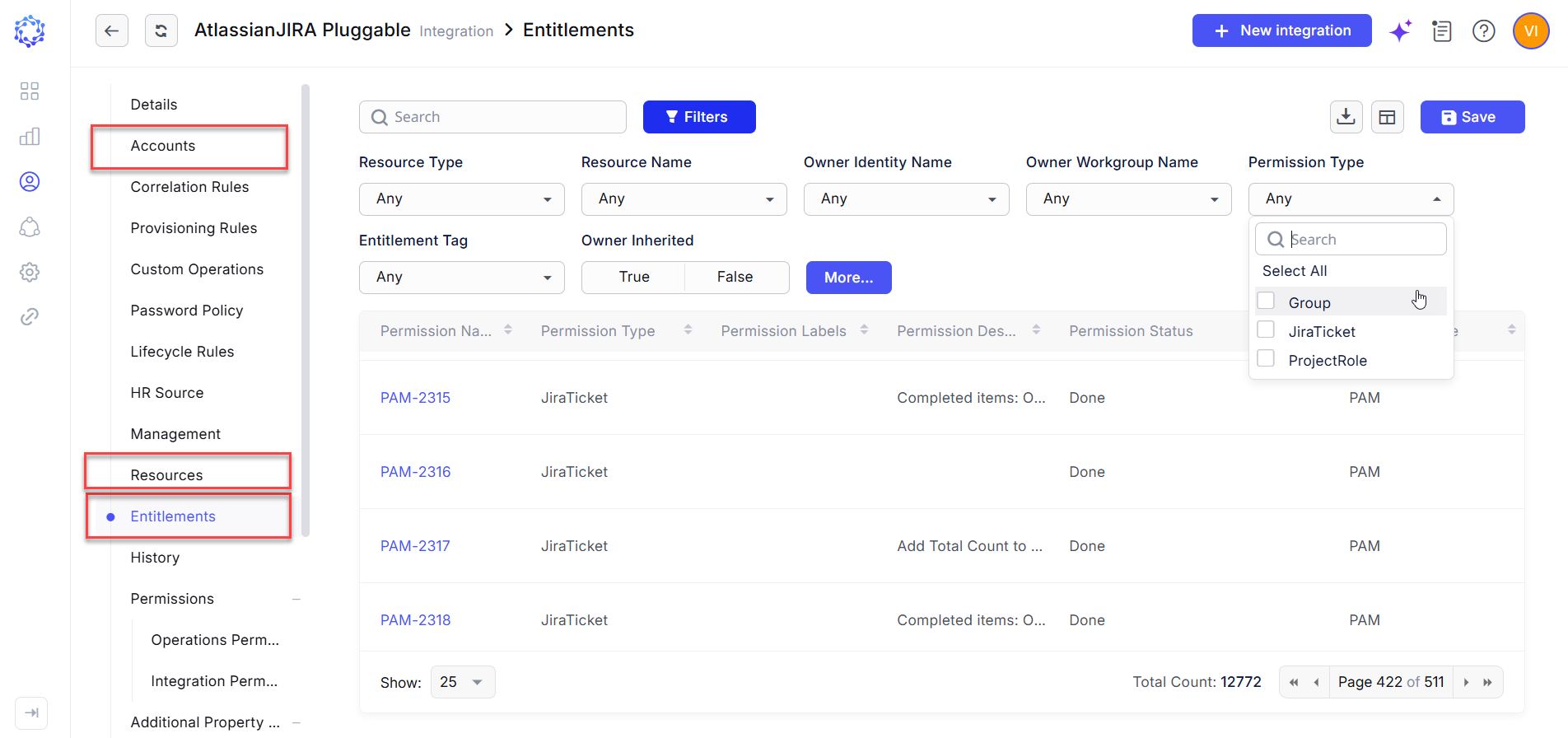 Entitlements catalog
Access auditing
Both perspectives—the Integration view and the Analytics area—present access relationship data that enables visibility into who has access to what. Each perspective provides this information in a different manner.
Within the Integration view, the catalogs expose access relationships as follows:
- The Accounts catalog displays the entitlements assigned to each account.
- The Resources catalog displays the identities associated with Atlassian accounts that have access to the selected resource. For example, when a Jira project is selected, the catalog displays all identities whose Atlassian accounts provide access to that project.
- The Entitlements catalog displays the identities associated with Atlassian accounts that are assigned the selected entitlement. For example, when a Jira project role is selected, the catalog displays all identities whose Atlassian accounts are assigned that role.
Within the Analytics area, the Detected Entitlements report provides a consolidated view of access assignments across all Atlassian accounts. Access can be analyzed from multiple dimensions, including Jira projects, Jira project roles, Atlassian groups, accounts, and identities.
Together, these dimensions support access auditing and governance by enabling users to identify who has access to what, perform filtering and aggregation of access data, and visualize access relationships through reports, charts, and dashboards.