
Blocked List configuration for MS SQL integration
For the MS SQL integration, installation of the Blocked List agent is required if Blocked List capabilities are to be used. The Blocked List stores policies against which the target system evaluates each logon attempt; if a match is detected, access is denied. These policies are defined in ObserveID and then propagated to the SQL Server. Blocked access attempts are recorded by access detection and provided for analysis and reporting within the Audit Log report in Analytics.
Components of the agent
The architecture of the Blocked List agent for the MS SQL integration comprises the following three components:
|
Component |
Installation Level |
Description |
|
|
Master database level |
The script creates a table that stores the policies. Location: SQL Server > Databases > System Databases > master > Tables > dbo.Blacklist |
|
|
Master database level |
The script creates a table that stores failed logons blocked by the target system, according to the Blocked List policies. Location: SQL Server > Databases > System Databases > master > Tables > dbo.BlacklistedConnectionsAttempts |
|
|
SQL Server level |
It is a trigger that validates logons against the policies. It runs in response to every logon event. The trigger fires after the authentication phase of logging in finishes, but before the user session is actually established. The trigger does not fire if authentication fails. Location: SQL Server > Server Objects > Triggers > LogonBlackList |
Pre-requisites to installation
Before starting the installation, it is recommended to consider the following pre-requisites:
|
Prerequisite |
Value |
Description |
|
User account for agent installation |
|
The user account used to install the agent must have the necessary privileges to:
|
|
User account for agent deinstallation |
|
The user account used to uninstall the agent must have the necessary privileges to:
|
|
Logon trigger account |
|
By default, the logon trigger runs under the |
Install the Blocked List agent for MS SQL
It is critically important that the components of the Blocked List agent for the MS SQL integration be installed in the following order:
blacklist.sqlblacklistedConnectionsAttempts.sqllogonBlacklist.sql
The procedure below provides installation guidance for each script on the SQL Server side, followed by the required configuration steps on the ObserveID side. Upon completion of the procedure, the Blocked List capability is ready for use.
-
Log in to the MS SQL Server using an account that has privileges to create tables in the master database and to create server-level triggers.
-
Click New Query.
-
Copy the
Blacklistscript below and paste it into the query. -
Make sure the query is going to be executed at the MASTER database level.
-
Tap the F5 button on the keyboard to execute the query.
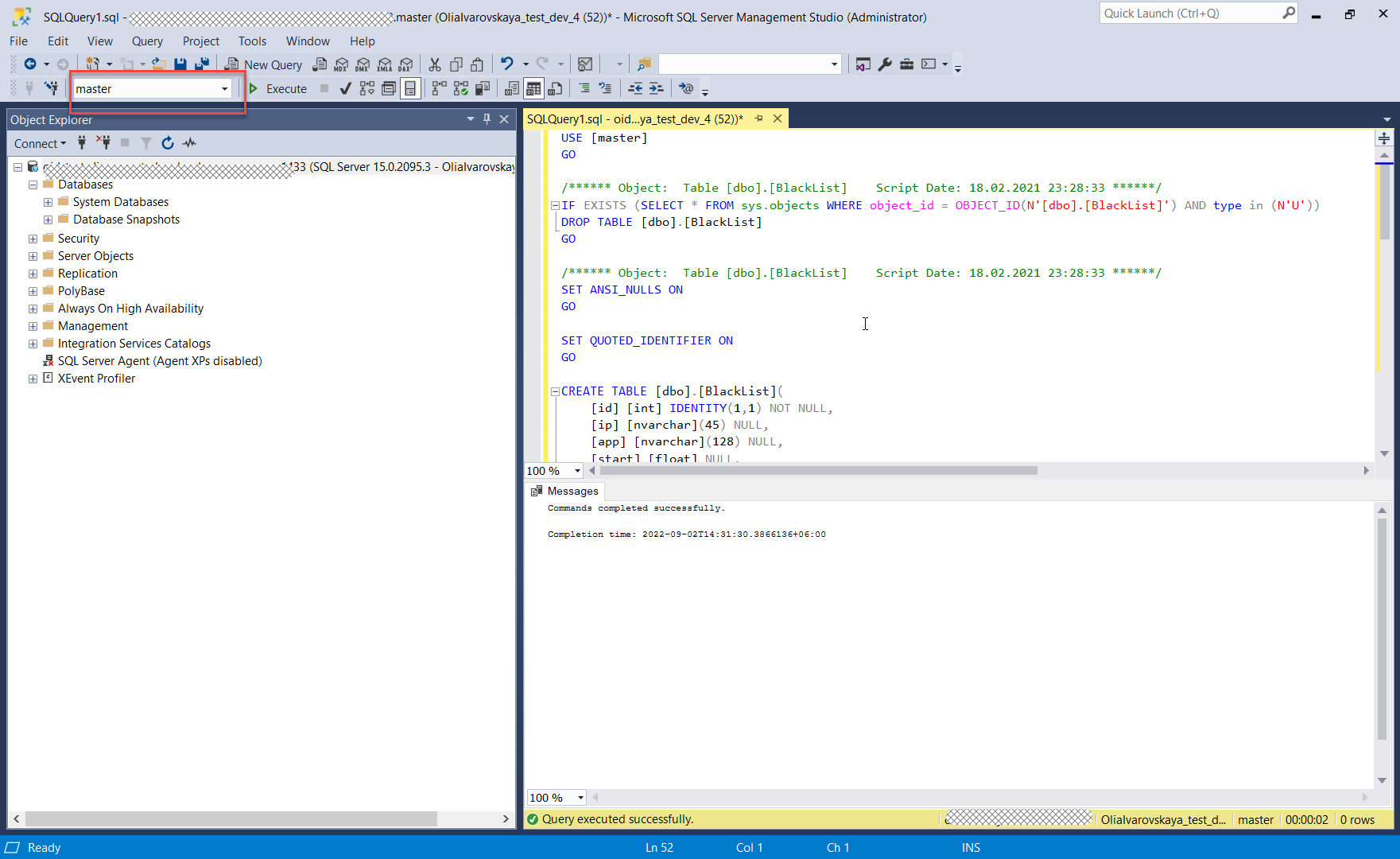 Blacklist script
-
-
Click New Query.
-
Copy the
BlacklistedConnectionsAttemptsscript below and paste it into the query. -
Make sure the query is going to be executed at the MASTER database level.
-
Tap the F5 button on the keyboard to execute the query.
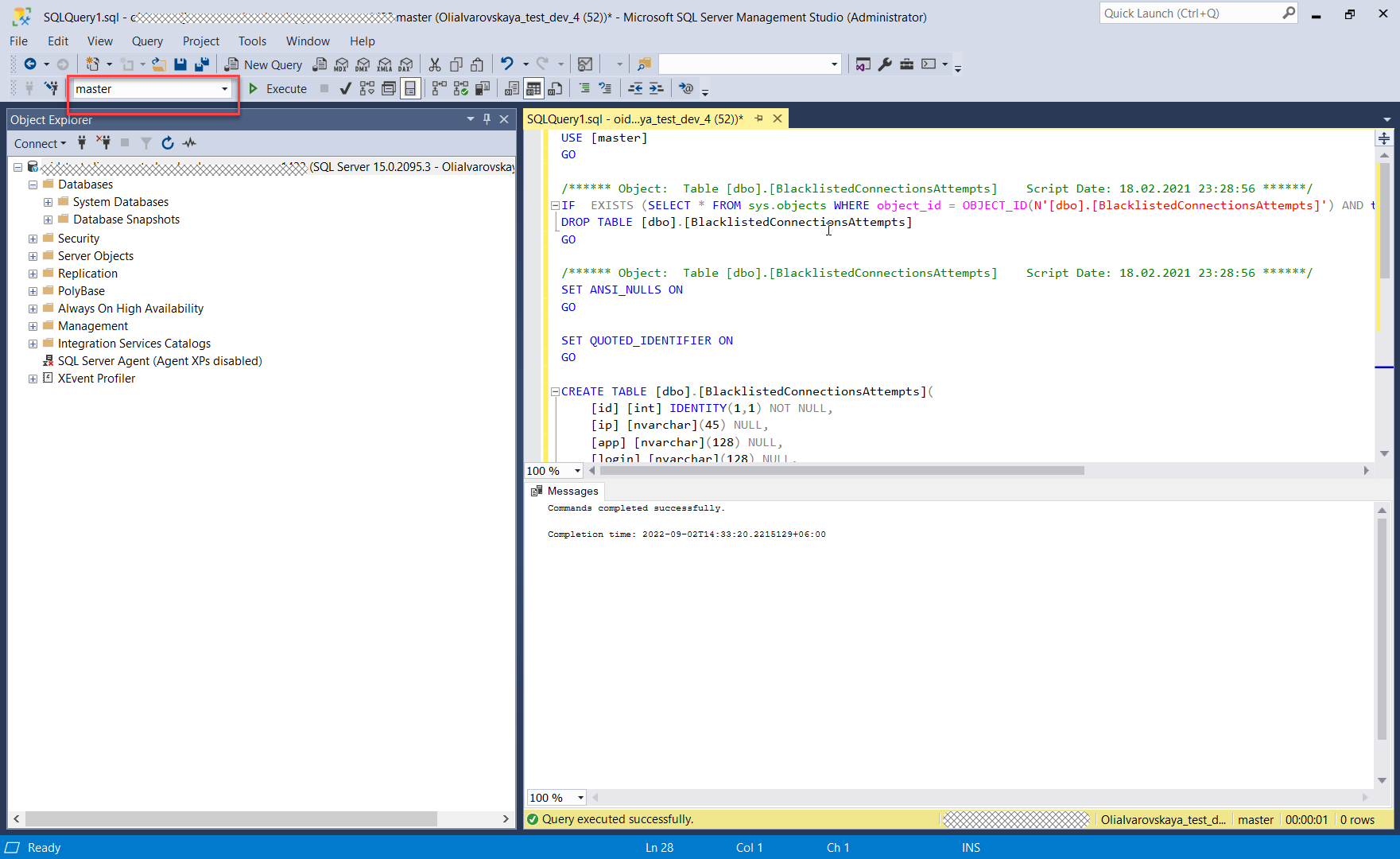 BlacklistedConnectionsAttempts script
-
-
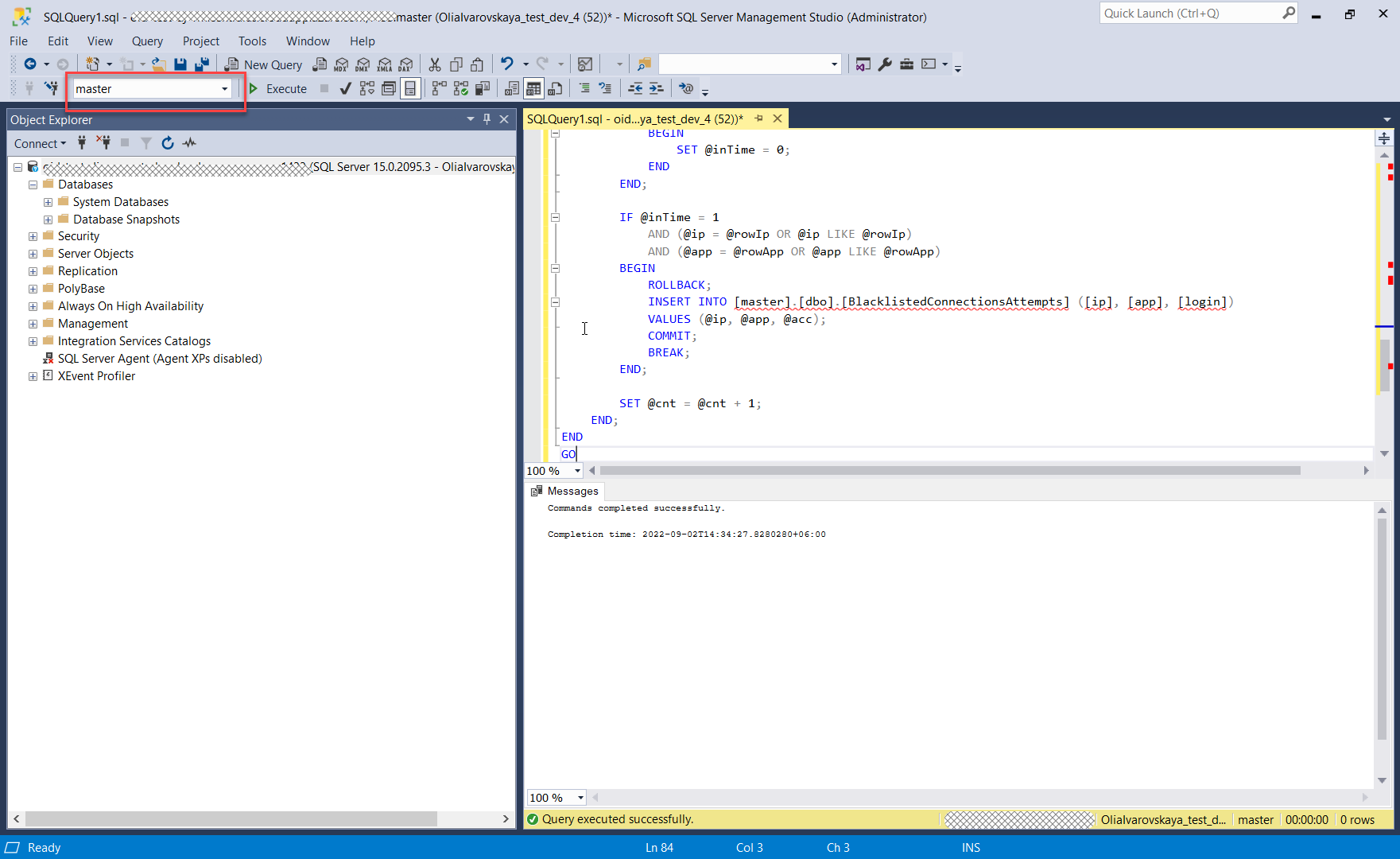
Click New Query.
-
Copy the
LogonBlackListscript below and paste it into the query. -
Make sure the query is going to be executed at the MASTER database level.
-
Tap the F5 button on the keyboard to execute the query.
-
-
Log in to ObserveID.
-
Go to: ObserveID > Identity Automation > Workflows > Tasks
-
Trigger the Data Import task for the MS SQL integration.
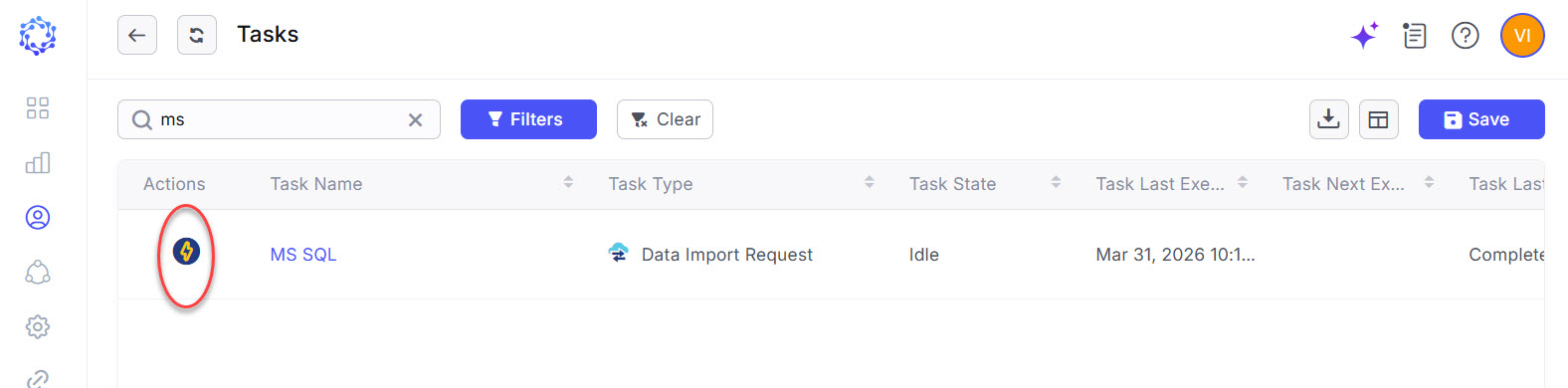 Data Import for the MS SQL integration
 NOTE: please, note that if needed, to verify that the agent was actually installed, it is possible to use the History of the Data Import task for the MS SQL integration. By expanding the
GetIntegrationDataevent in the history, and then expanding theReturn Valuesection, heed theIsBlackListSupportedparameter. If it is brought astrue, the agent is installed on the target.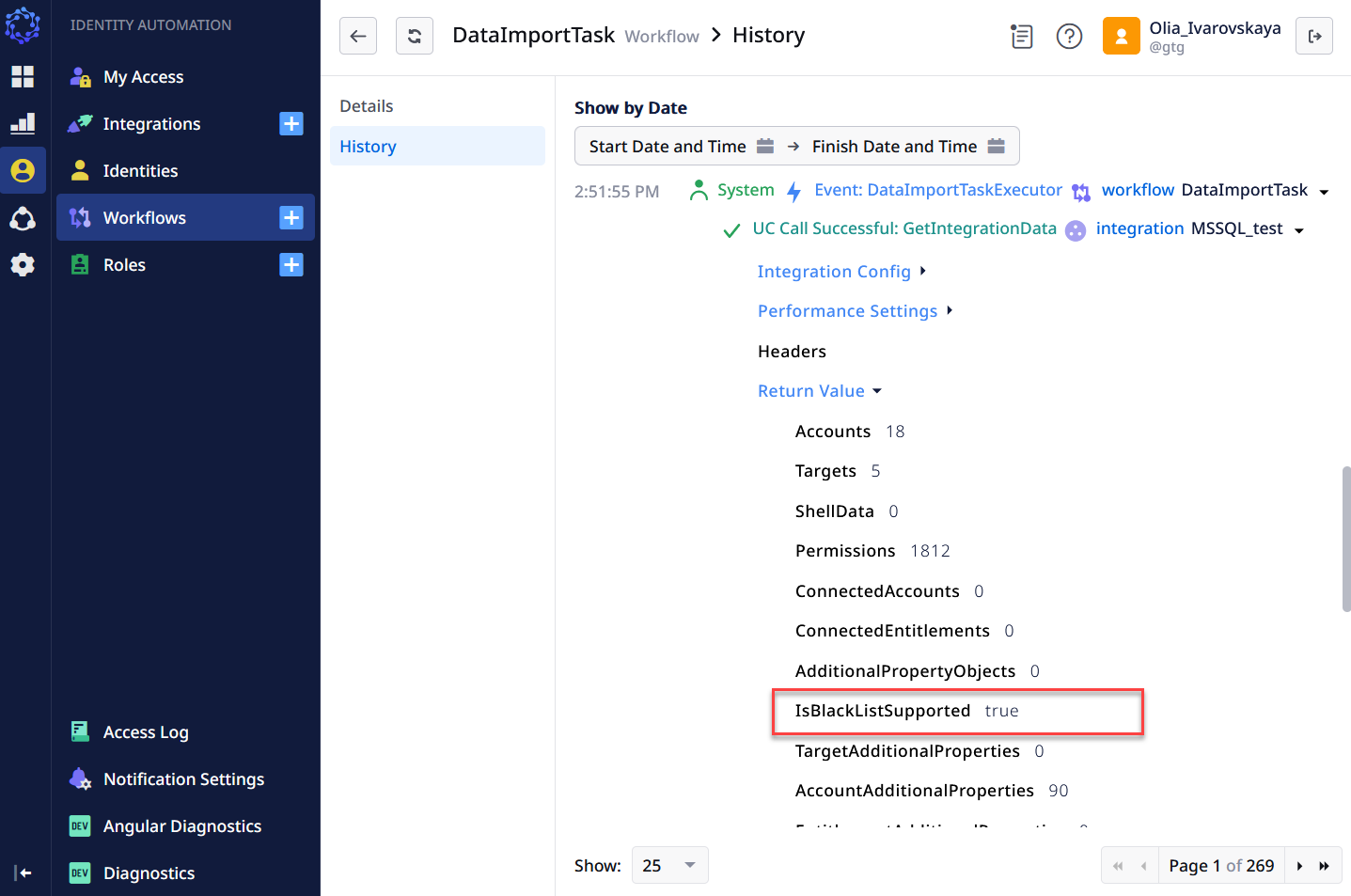 History of Data Import
 -
Make certain the ‘Agent is not installed’ notice has been removed for the MS SQL integration in: ObserveID > Identity Automation > Integrations > {MS SQL integration} > Blocked and Exception Lists
If the Blocked and Exception Lists page does not display the “Agent is not installed” notice, the Blocked List capability is ready for configuration and use. If the notice is present, it should be investigated using Access Log records.
BlackList script
Copy and paste the following script into the new query in MS SQL:
USE [master]
GO

/****** Object:  Table [dbo].[BlackList]    Script Date: 18.02.2021 23:28:33 ******/
IF EXISTS (SELECT * FROM sys.objects WHERE object_id = OBJECT_ID(N'[dbo].[BlackList]') AND type in (N'U'))
DROP TABLE [dbo].[BlackList]
GO

/****** Object:  Table [dbo].[BlackList]    Script Date: 18.02.2021 23:28:33 ******/
SET ANSI_NULLS ON
GO

SET QUOTED_IDENTIFIER ON
GO

CREATE TABLE [dbo].[BlackList](
    [id] [int] IDENTITY(1,1) NOT NULL,
    [ip] [nvarchar](45) NULL,
    [app] [nvarchar](128) NULL,
    [start] [float] NULL,
    [finish] [float] NULL,
    CONSTRAINT [PK_blacklists] PRIMARY KEY CLUSTERED
    (
        [id] ASC
    )WITH (PAD_INDEX = OFF, STATISTICS_NORECOMPUTE = OFF, IGNORE_DUP_KEY = OFF, ALLOW_ROW_LOCKS = ON, ALLOW_PAGE_LOCKS = ON) ON [PRIMARY]
) ON [PRIMARY]
GO

/****** Object:  Table [dbo].[BlackList]    Script Date: 18.02.2021 23:28:33 ******/
IF EXISTS (SELECT * FROM sys.objects WHERE object_id = OBJECT_ID(N'[dbo].[UCAccount]') AND type in (N'U'))
DROP TABLE [dbo].[UCAccount]
GO

/****** Object:  Table [dbo].[UCAccount]    Script Date: 9/9/2021 3:10:08 PM ******/
SET ANSI_NULLS ON
GO

SET QUOTED_IDENTIFIER ON
GO

CREATE TABLE [dbo].[UCAccount](
    [AccountName] [nvarchar](255) NOT NULL,
    UNIQUE NONCLUSTERED
    (
        [AccountName] ASC
    )WITH (PAD_INDEX = OFF, STATISTICS_NORECOMPUTE = OFF, IGNORE_DUP_KEY = OFF, ALLOW_ROW_LOCKS = ON, ALLOW_PAGE_LOCKS = ON, OPTIMIZE_FOR_SEQUENTIAL_KEY = OFF) ON [PRIMARY]
) ON [PRIMARY]
GO
BlacklistedConnectionsAttempts script
Copy and paste the following script into the new query in MS SQL:
USE [master]
GO

/****** Object:  Table [dbo].[BlacklistedConnectionsAttempts]    Script Date: 18.02.2021 23:28:56 ******/
IF  EXISTS (SELECT * FROM sys.objects WHERE object_id = OBJECT_ID(N'[dbo].[BlacklistedConnectionsAttempts]') AND type in (N'U'))
DROP TABLE [dbo].[BlacklistedConnectionsAttempts]
GO

/****** Object:  Table [dbo].[BlacklistedConnectionsAttempts]    Script Date: 18.02.2021 23:28:56 ******/
SET ANSI_NULLS ON
GO

SET QUOTED_IDENTIFIER ON
GO

CREATE TABLE [dbo].[BlacklistedConnectionsAttempts](
    [id] [int] IDENTITY(1,1) NOT NULL,
    [ip] [nvarchar](45) NULL,
    [app] [nvarchar](128) NULL,
    [login] [nvarchar](128) NULL,
    CONSTRAINT [PK_blacklistedConnectionAttempts] PRIMARY KEY CLUSTERED
    (
        [id] ASC
    )WITH (PAD_INDEX = OFF, STATISTICS_NORECOMPUTE = OFF, IGNORE_DUP_KEY = OFF, ALLOW_ROW_LOCKS = ON, ALLOW_PAGE_LOCKS = ON, FILLFACTOR = 1) ON [PRIMARY]
) ON [PRIMARY]
GO
LogonBlackList script
Copy and paste the following script into the new query in MS SQL:
CREATE OR ALTER TRIGGER LogonBlackList ON ALL SERVER
WITH EXECUTE AS 'sa'
FOR LOGON
AS
BEGIN
    if ORIGINAL_LOGIN() = (SELECT TOP 1 AccountName FROM UCAccount)
    BEGIN
        RETURN
    END

    DECLARE @ip NVARCHAR(48);
    DECLARE @app NVARCHAR(128);
    DECLARE @acc NVARCHAR(128);

    DECLARE @rowCnt BIGINT = 0;
    DECLARE @cnt INT = 1;

    DECLARE @curDate DATETIME;
    DECLARE @curHour FLOAT;
    DECLARE @curMin FLOAT;
    DECLARE @curTime FLOAT;

    SET @curDate = GETUTCDATE();
    SET @curHour = DATEPART(hh, @curDate);
    SET @curMin = DATEPART(n, @curDate);
    SET @curTime = @curHour + (@curMin / 60);

    SET @ip = convert(NVARCHAR(48), CONNECTIONPROPERTY('client_net_address'));

    IF (@ip is NULL)
    BEGIN
        SET @ip = '';
    END;

    SET @app = APP_NAME();
    SET @acc = EVENTDATA().value('(/EVENT_INSTANCE/LoginName)[1]','nvarchar(128)');

    SELECT @rowCnt = COUNT(0) FROM [master].[dbo].[BlackList];

    DECLARE @numberedBlacklist TABLE (rowNum BIGINT, ip NVARCHAR(48), app NVARCHAR(128), start FLOAT, finish FLOAT);

    INSERT INTO @numberedBlacklist ([rowNum], [ip], [app], [start], [finish])
    SELECT ROW_NUMBER() OVER(ORDER BY Id) AS [rowNum], [ip], [app], [start], [finish]
    FROM [master].[dbo].[BlackList]

    WHILE @cnt <= @rowCnt
    BEGIN
        DECLARE @rowIp NVARCHAR(48);
        DECLARE @rowApp NVARCHAR(128);
        DECLARE @start FLOAT;
        DECLARE @finish FLOAT;

        SELECT @rowIp = [ip], @rowApp = [app], @start = [start], @finish = [finish]
        FROM @numberedBlacklist
        WHERE [rowNum] = @cnt

        DECLARE @inTime BIT = 1;
        IF @start IS NOT NULL AND @finish IS NOT NULL
        BEGIN
            IF @finish > @start AND (@curTime > @finish OR @curTime < @start)
            BEGIN
                SET @inTime = 0;
            END
            ELSE IF @finish < @start AND @curTime > @finish AND @curTime < @start
            BEGIN
                SET @inTime = 0;
            END
        END;

        IF @inTime = 1
            AND (@ip = @rowIp OR @ip LIKE @rowIp)
            AND (@app = @rowApp OR @app LIKE @rowApp)
        BEGIN
            ROLLBACK;
            INSERT INTO [master].[dbo].[BlacklistedConnectionsAttempts] ([ip], [app], [login])
            VALUES (@ip, @app, @acc);
            COMMIT;
            BREAK;
        END;

        SET @cnt = @cnt + 1;
    END;
END
GO
Uninstall the Blocked List agent for MS SQL
It is critically important to uninstall the components of the Blocked List agent for the MS SQL integration in the following order:
- the trigger:
LogonBlackList - the table:
Blacklist - the table:
BlacklistedConnectionsAttempts
The procedure below provides uninstallation guidance for the Blocked List artifacts on the SQL Server side, followed by the required configuration steps on the ObserveID side. Upon completion of the procedure, the Blocked List capability is fully removed.
-
Log in to the MS SQL server with the user account that allows you to drop the logon trigger at the server level and to delete tables at the MASTER database.
-
Delete the trigger:
LogonBlackListNote: The uninstallation of the Blocked List agent must begin with deleting the trigger. If there is any uncertainty that the trigger has been successfully removed, do not proceed to the subsequent steps of deleting the tables. If the trigger remains active while the tables are deleted, error 17892 (see the screenshot below) will be raised, as the logon trigger code cannot execute successfully. For more information, refer to: https://docs.microsoft.com/en-us/sql/relational-databases/errors-events/mssqlserver-17892-database-engine-error?view=sql-server-ver15
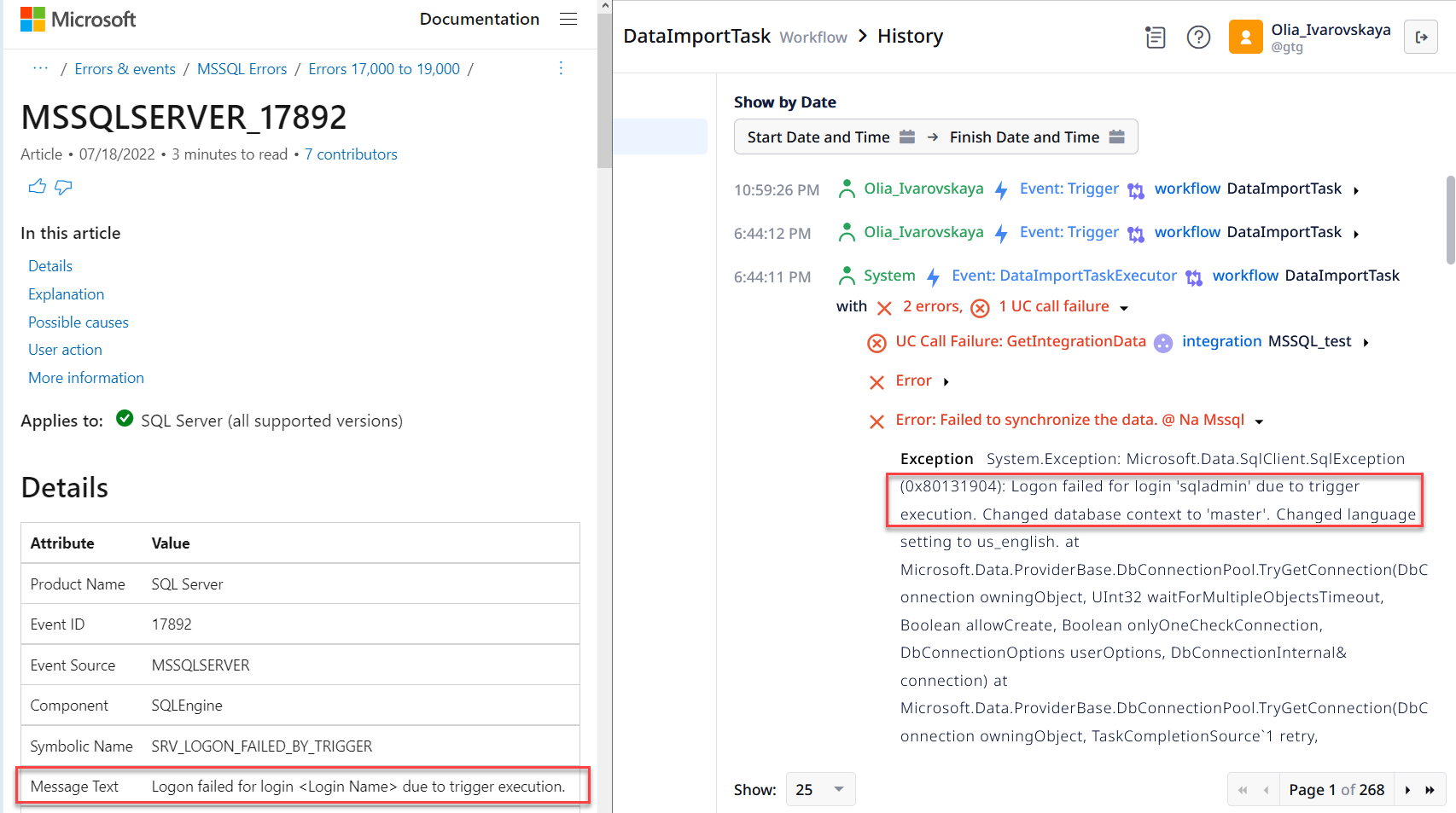 Error 17892
 -
Click New Query.
-
Enter
DROP TABLE [dbo].[BlacklistedConnectionsAttempts]; -
Make sure the query is going to be executed at the MASTER database level.
-
Tap the F5 button on the keyboard to execute the query.
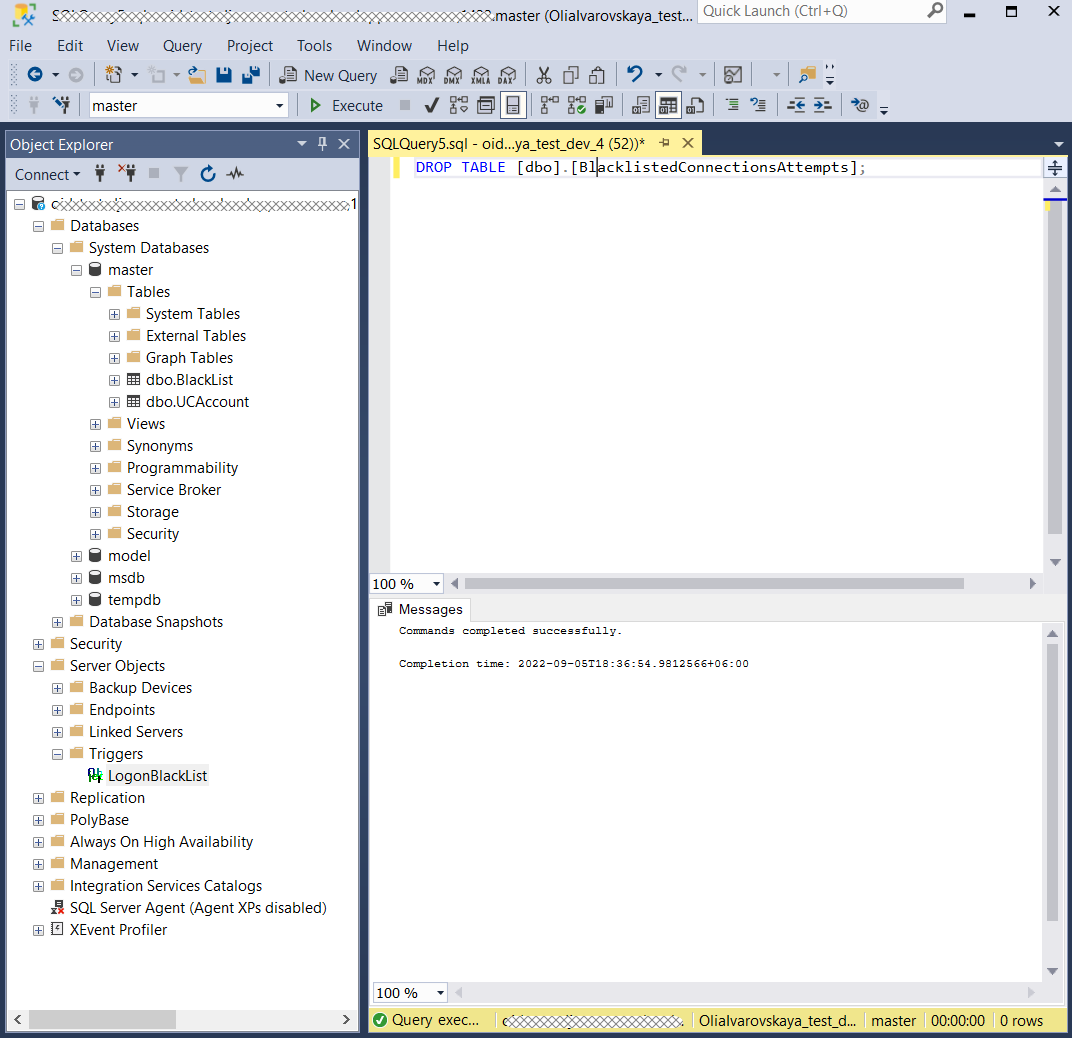 Delete the table
-
-
Click New Query.
-
Enter
DROP TABLE [dbo].[BlackList]; -
Make sure the query is going to be executed at the MASTER database level.
-
Tap the F5 button on the keyboard to execute the query.
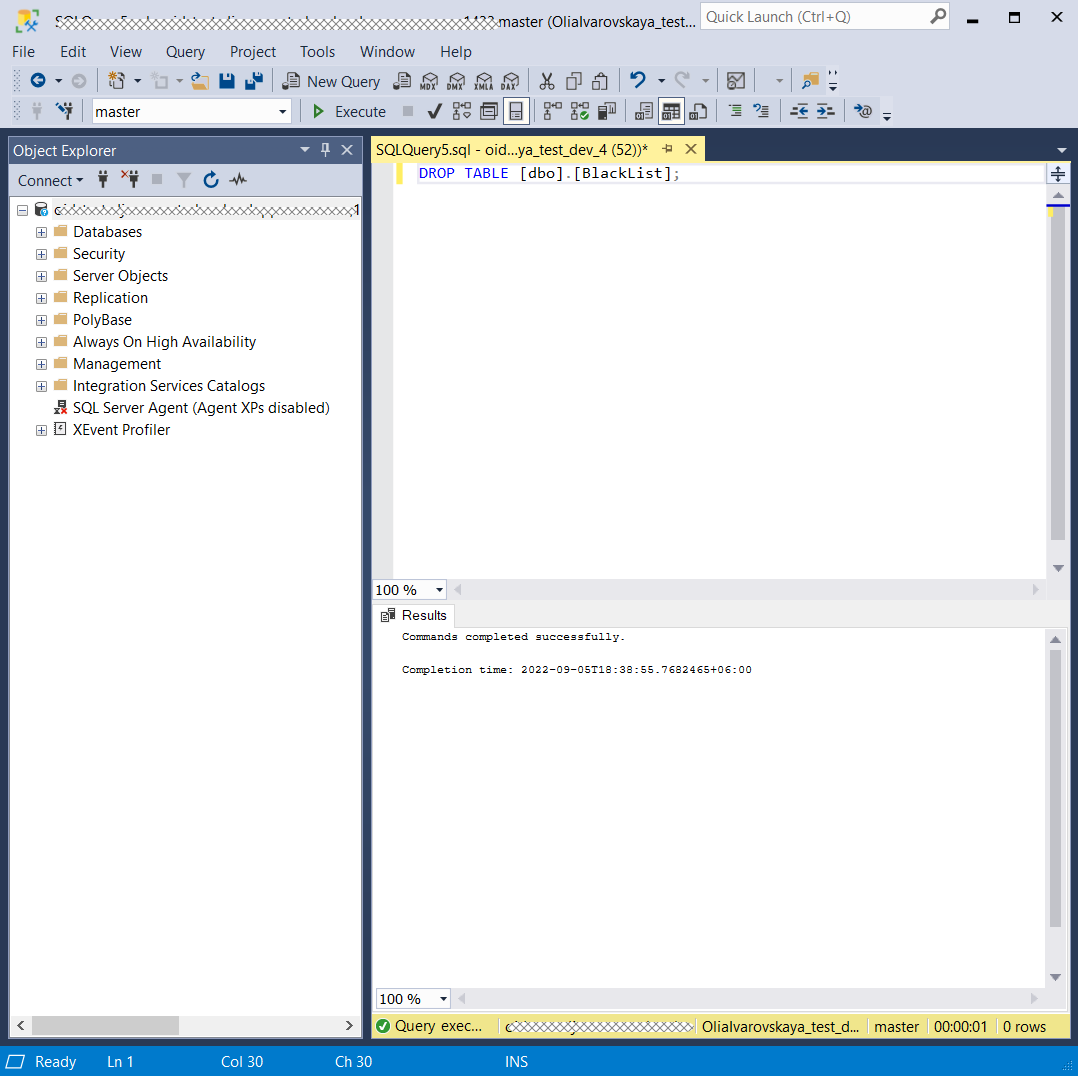 Delete the Black List
-
-
Log in to ObserveID
-
Go to: ObserveID > Identity Automation > Workflows > Tasks
-
Trigger the Data Import task for the MS SQL integration.
Data Import for the MS SQL integrationNote: To verify that the agent has been successfully uninstalled, review the History of the Data Import task for the MS SQL integration. Expand the
GetIntegrationDataevent, then open theReturn Valuesection and check theIsBlackListSupportedparameter. If this parameter is set tofalse, the agent is not installed on the target system.
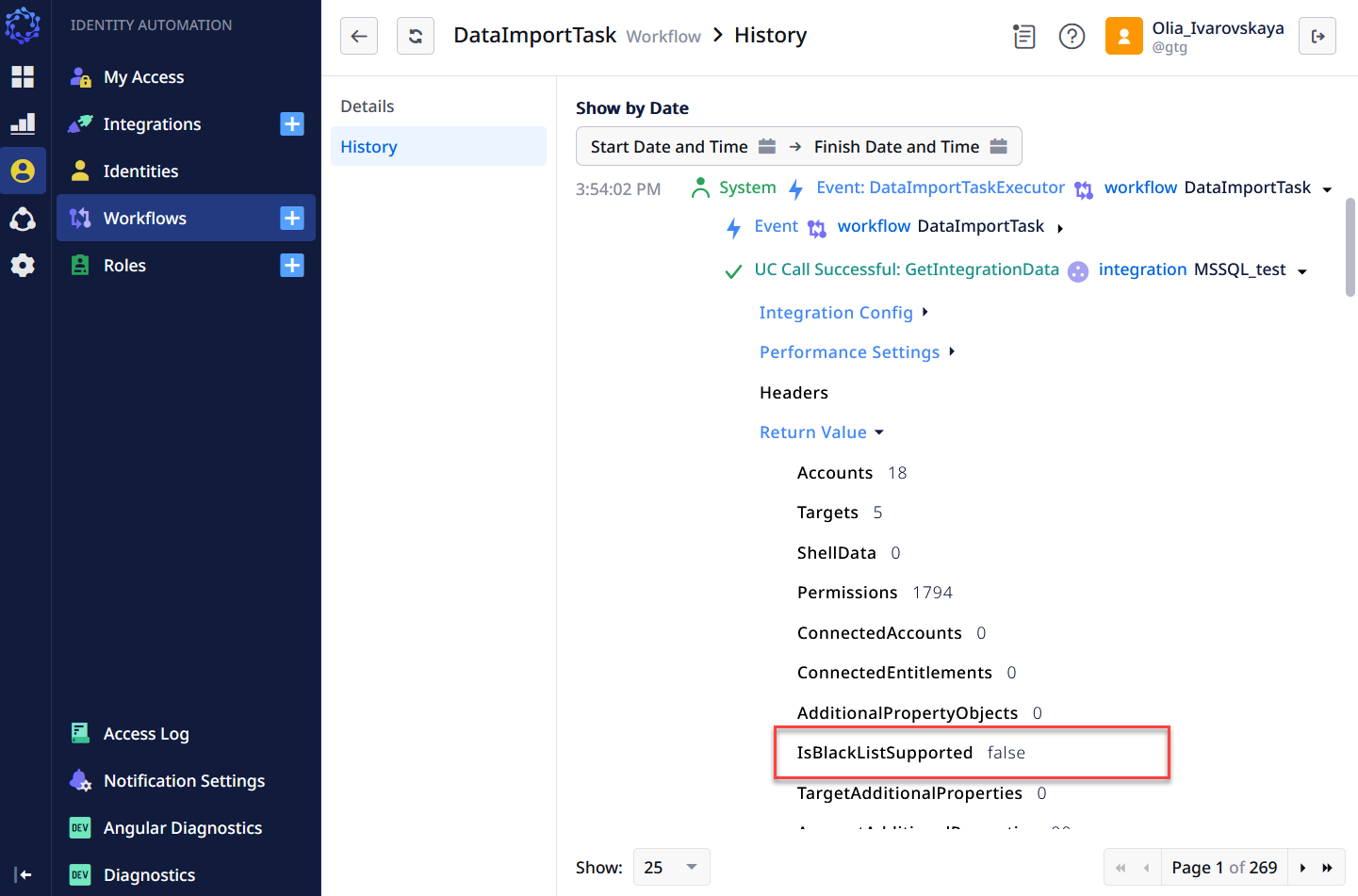 History of the Data Import for the MS SQL integration
 -
Make certain the ‘Agent is not installed’ notice has shown up for the MS SQL integration again in: ObserveID > Identity Automation > Integrations > {MS SQL integration} > Blocked and Exception Lists